Author: Zack Ulissi (Meta, CMU), with help from AI coding agents / LLMs
Original paper: Bjarne Kreitz et al. JPCC (2021)
Overview
This tutorial demonstrates how to use the Universal Model for Atoms (UMA) machine learning potential to perform comprehensive catalyst surface analysis. We replicate key computational workflows from “Microkinetic Modeling of CO₂ Desorption from Supported Multifaceted Ni Catalysts” by Bjarne Kreitz (now faculty at Georgia Tech!), showing how ML potentials can accelerate computational catalysis research.
Installation and Setup
This tutorial uses a number of helpful open source packages:
ase- Atomic Simulation Environmentfairchem- FAIR Chemistry ML potentials (formerly OCP)pymatgen- Materials analysismatplotlib- Visualizationnumpy- Numerical computingtorch-dftd- Dispersion corrections among many others!
Huggingface setups
You need to get a HuggingFace account and request access to the UMA models.
You need a Huggingface account, request access to https://
Permissions: Read access to contents of all public gated repos you can access
Then, add the token as an environment variable using huggingface-cli login:
# Enter token via huggingface-cli
! huggingface-cli login
or you can set the token via HF_TOKEN variable:
# Set token via env variable
import os

os.environ["HF_TOKEN"] = "MYTOKEN"
FAIR Chemistry (UMA) installation
It may be enough to use pip install fairchem-core. This gets you the latest version on PyPi (https://
Here we install some sub-packages. This can take 2-5 minutes to run.
! pip install fairchem-core[docs] fairchem-data-oc fairchem-applications-cattsunami x3dase# Check that packages are installed
!pip list | grep fairchemfairchem-applications-cattsunami 1.1.2.dev377+gde5db0158
fairchem-core 2.22.1.dev1+gde5db0158
fairchem-data-oc 1.0.3.dev377+gde5db0158
fairchem-data-omat 0.2.1.dev282+gde5db0158
import fairchem.core

fairchem.core.__version__'2.22.1.dev1+gde5db0158'Package imports
First, let’s import all necessary libraries and initialize the UMA-S-1P2 predictor:
from pathlib import Path

import ase.io
import matplotlib.pyplot as plt
import numpy as np
from ase import Atoms
from ase.build import bulk
from ase.constraints import FixBondLengths
from ase.io import write
from ase.mep import interpolate
from ase.mep.dyneb import DyNEB
from ase.optimize import FIRE, LBFGS
from ase.vibrations import Vibrations
from ase.visualize import view
from fairchem.core import FAIRChemCalculator, pretrained_mlip
from fairchem.data.oc.core import (
    Adsorbate,
    AdsorbateSlabConfig,
    Bulk,
    MultipleAdsorbateSlabConfig,
    Slab,
)
from pymatgen.analysis.wulff import WulffShape
from pymatgen.core import Lattice, Structure
from pymatgen.core.surface import SlabGenerator
from pymatgen.io.ase import AseAtomsAdaptor
from torch_dftd.torch_dftd3_calculator import TorchDFTD3Calculator

# Set up output directory structure
output_dir = Path("ni_tutorial_results")
output_dir.mkdir(exist_ok=True)

# Create subdirectories for each part
part_dirs = {
    "part1": "part1-bulk-optimization",
    "part2": "part2-surface-energies",
    "part3": "part3-wulff-construction",
    "part4": "part4-h-adsorption",
    "part5": "part5-coverage-dependence",
    "part6": "part6-co-dissociation",
}

for key, dirname in part_dirs.items():
    (output_dir / dirname).mkdir(exist_ok=True)

# Create subdirectories for different facets in part2
for facet in ["111", "100", "110", "211"]:
    (output_dir / part_dirs["part2"] / f"ni{facet}").mkdir(exist_ok=True)

# Initialize the UMA-S-1P2 predictor
print("\nLoading UMA-S-1P2 model...")
predictor = pretrained_mlip.get_predict_unit("uma-s-1p2")
print("✓ Model loaded successfully!")
Loading UMA-S-1P2 model...
WARNING:root:device was not explicitly set, using device='cuda'.
✓ Model loaded successfully!
It is somewhat time consuming to run this. We’re going to use a small number of bulks for the testing of this documentation, but otherwise run all of the results for the actual documentation.
import os

fast_docs = os.environ.get("FAST_DOCS", "false").lower() == "true"
if fast_docs:
    num_sites = 2
    relaxation_steps = 20
else:
    num_sites = 5
    relaxation_steps = 300
Part 1: Bulk Crystal Optimization
Introduction
Before studying surfaces, we need to determine the equilibrium lattice constant of bulk Ni. This is crucial because surface energies and adsorbate binding depend strongly on the underlying lattice parameter.
Theory
For FCC metals like Ni, the lattice constant a defines the unit cell size. The experimental value for Ni is a = 3.524 Å at room temperature. We’ll optimize both atomic positions and the cell volume to find the ML potential’s equilibrium structure.
# Create initial FCC Ni structure
a_initial = 3.52  # Å, close to experimental
ni_bulk = bulk("Ni", "fcc", a=a_initial, cubic=True)

print(f"Initial lattice constant: {a_initial:.2f} Å")
print(f"Number of atoms: {len(ni_bulk)}")

# Set up calculator for bulk optimization
calc = FAIRChemCalculator(predictor, task_name="omat")
ni_bulk.calc = calc

# Use ExpCellFilter to allow cell relaxation
from ase.filters import ExpCellFilter

ecf = ExpCellFilter(ni_bulk)

# Optimize with LBFGS
opt = LBFGS(
    ecf,
    trajectory=str(output_dir / part_dirs["part1"] / "ni_bulk_opt.traj"),
    logfile=str(output_dir / part_dirs["part1"] / "ni_bulk_opt.log"),
)
opt.run(fmax=0.05, steps=relaxation_steps)

# Extract results
cell = ni_bulk.get_cell()
a_optimized = cell[0, 0]
a_exp = 3.524  # Experimental value
error = abs(a_optimized - a_exp) / a_exp * 100

print(f"\n{'='*50}")
print(f"Experimental lattice constant: {a_exp:.2f} Å")
print(f"Optimized lattice constant:    {a_optimized:.2f} Å")
print(f"Relative error:                {error:.2f}%")
print(f"{'='*50}")

ase.io.write(str(output_dir / part_dirs["part1"] / "ni_bulk_relaxed.cif"), ni_bulk)

# Store results for later use
a_opt = a_optimized
Initial lattice constant: 3.52 Å
Number of atoms: 4
/tmp/ipykernel_8836/3959847705.py:15: DeprecationWarning: Use FrechetCellFilter for better convergence w.r.t. cell variables.
  ecf = ExpCellFilter(ni_bulk)
WARNING:root:Model is being compiled this might take a while for the first time
W0819 23:55:20.747000 8836 site-packages/torch/_logging/_internal.py:1345] [0/0] Profiler record function <class 'torch.autograd.profiler.record_function'> will be ignored
W0819 23:55:57.984000 8836 site-packages/torch/_inductor/utils.py:1953] [6/0] Not enough SMs to use max_autotune_gemm mode
/home/runner/work/_tool/Python/3.12.14/x64/lib/python3.12/site-packages/torch/_inductor/lowering.py:2352: FutureWarning: `torch._prims_common.check` is deprecated and will be removed in the future. Please use `torch._check*` functions instead.
  check(
==================================================
Experimental lattice constant: 3.52 Å
Optimized lattice constant:    3.51 Å
Relative error:                0.50%
==================================================
Part 2: Surface Energy Calculations
Introduction
Surface energy (γ) quantifies the thermodynamic cost of creating a surface. It determines surface stability, morphology, and catalytic activity. We’ll calculate γ for four low-index Ni facets: (111), (100), (110), and (211).
Theory
The surface energy is defined as:
where:
= total energy of the slab
= number of atoms in the slab
= bulk energy per atom
= surface area
Factor of 2 accounts for two surfaces (top and bottom)
Challenge: Direct calculation suffers from quantum size effects, and if you were doing DFT calculations small numerical errors in the simulation or from the K-point grid sampling can lead to small (but significant) errors in the bulk lattice energy.
Solution: It is fairly common when calculating surface energies to use the bulk energy from a bulk relaxation in the above equation. However, because DFT often has some small numerical noise in the predictions from k-point convergence, this might lead to the wrong surface energy. Instead, two more careful schemes are either:
Calculate the energy of a bulk structure oriented to each slab to maximize cancellation of small numerical errors or
Calculate the energy of multiple slabs at multiple thicknesses and extrapolate to zero thickness. The intercept will be the surface energy, and the slope will be a fitted bulk energy. A benefit of this approach is that it also forces us to check that we have a sufficiently thick slab for a well defined surface energy; if the fit is non-linear we need thicker slabs.
We’ll use the linear extrapolation method here as it’s more likely to work in future DFT studies if you use this code!
Step 1: Setup and Bulk Energy Reference
First, we’ll set up the calculation parameters and get the bulk energy reference:
# Calculate surface energies for all facets
facets = [(1, 1, 1), (1, 0, 0), (1, 1, 0), (2, 1, 1)]
surface_energies = {}
surface_energies_SI = {}
all_fit_data = {}

# Get bulk energy reference (only need to do this once)
E_bulk_total = ni_bulk.get_potential_energy()
N_bulk = len(ni_bulk)
E_bulk_per_atom = E_bulk_total / N_bulk

print(f"Bulk energy reference:")
print(f"  Total energy: {E_bulk_total:.2f} eV")
print(f"  Number of atoms: {N_bulk}")
print(f"  Energy per atom: {E_bulk_per_atom:.6f} eV/atom")
Bulk energy reference:
Total energy: -21.98 eV
Number of atoms: 4
Energy per atom: -5.494851 eV/atom
Step 2: Generate and Relax Slabs
Now we’ll loop through each facet, generating slabs at three different thicknesses:
# Convert bulk to pymatgen structure for slab generation
adaptor = AseAtomsAdaptor()
ni_structure = adaptor.get_structure(ni_bulk)

for facet in facets:
    facet_str = "".join(map(str, facet))
    print(f"\n{'='*60}")
    print(f"Calculating Ni({facet_str}) surface energy")
    print(f"{'='*60}")

    # Calculate for three thicknesses
    thicknesses = [4, 6, 8]  # layers
    n_atoms_list = []
    energies_list = []

    for n_layers in thicknesses:
        print(f"\n  Thickness: {n_layers} layers")

        # Generate slab
        slabgen = SlabGenerator(
            ni_structure,
            facet,
            min_slab_size=n_layers * a_opt / np.sqrt(sum([h**2 for h in facet])),
            min_vacuum_size=10.0,
            center_slab=True,
        )
        pmg_slab = slabgen.get_slabs()[0]
        slab = adaptor.get_atoms(pmg_slab)
        slab.center(vacuum=10.0, axis=2)

        print(f"    Atoms: {len(slab)}")

        # Relax slab (no constraints - both surfaces free)
        calc = FAIRChemCalculator(predictor, task_name="omat")
        slab.calc = calc
        opt = LBFGS(slab, logfile=None)
        opt.run(fmax=0.05, steps=relaxation_steps)

        E_slab = slab.get_potential_energy()
        n_atoms_list.append(len(slab))
        energies_list.append(E_slab)
        print(f"    Energy: {E_slab:.2f} eV")

    # Linear regression: E_slab = slope * N + intercept
    coeffs = np.polyfit(n_atoms_list, energies_list, 1)
    slope = coeffs[0]
    intercept = coeffs[1]

    # Extract surface energy from intercept
    cell = slab.get_cell()
    area = np.linalg.norm(np.cross(cell[0], cell[1]))
    gamma = intercept / (2 * area)  # eV/Ų
    gamma_SI = gamma * 16.0218  # J/m²

    print(f"\n  Linear fit:")
    print(f"    Slope:     {slope:.6f} eV/atom (cf. bulk {E_bulk_per_atom:.6f})")
    print(f"    Intercept: {intercept:.2f} eV")
    print(f"\n  Surface energy:")
    print(f"    γ = {gamma:.6f} eV/Ų = {gamma_SI:.2f} J/m²")

    # Store results and fit data
    surface_energies[facet] = gamma
    surface_energies_SI[facet] = gamma_SI
    all_fit_data[facet] = {
        "n_atoms": n_atoms_list,
        "energies": energies_list,
        "slope": slope,
        "intercept": intercept,
    }
============================================================
Calculating Ni(111) surface energy
============================================================

  Thickness: 4 layers
    Atoms: 4
    Energy: -20.66 eV

  Thickness: 6 layers
    Atoms: 6
    Energy: -31.64 eV

  Thickness: 8 layers
    Atoms: 8
    Energy: -42.63 eV

  Linear fit:
    Slope:     -5.491985 eV/atom (cf. bulk -5.494851)
    Intercept: 1.31 eV

  Surface energy:
    γ = 0.122708 eV/Ų = 1.97 J/m²

============================================================
Calculating Ni(100) surface energy
============================================================

  Thickness: 4 layers
    Atoms: 8
    Energy: -42.15 eV

  Thickness: 6 layers
    Atoms: 12
    Energy: -64.13 eV

  Thickness: 8 layers
    Atoms: 16
    Energy: -86.11 eV

  Linear fit:
    Slope:     -5.494798 eV/atom (cf. bulk -5.494851)
    Intercept: 1.80 eV

  Surface energy:
    γ = 0.146725 eV/Ų = 2.35 J/m²

============================================================
Calculating Ni(110) surface energy
============================================================

  Thickness: 4 layers
    Atoms: 8
    Energy: -41.36 eV

  Thickness: 6 layers
    Atoms: 12
    Energy: -63.34 eV

  Thickness: 8 layers
    Atoms: 16
    Energy: -85.32 eV

  Linear fit:
    Slope:     -5.494075 eV/atom (cf. bulk -5.494851)
    Intercept: 2.59 eV

  Surface energy:
    γ = 0.148945 eV/Ų = 2.39 J/m²

============================================================
Calculating Ni(211) surface energy
============================================================

  Thickness: 4 layers
Atoms: 8
    Energy: -39.57 eV

  Thickness: 6 layers
Atoms: 12
    Energy: -61.58 eV

  Thickness: 8 layers
Atoms: 16
    Energy: -83.54 eV

  Linear fit:
    Slope:     -5.496961 eV/atom (cf. bulk -5.494851)
    Intercept: 4.40 eV

  Surface energy:
    γ = 0.146169 eV/Ų = 2.34 J/m²
Step 3: Visualize Linear Fits
Let’s visualize the linear extrapolation for all four facets:
# Visualize linear fits for all facets
fig, axes = plt.subplots(2, 2, figsize=(12, 10))
axes = axes.flatten()

for idx, facet in enumerate(facets):
    ax = axes[idx]
    data = all_fit_data[facet]

    # Plot data points
    ax.scatter(
        data["n_atoms"],
        data["energies"],
        s=100,
        color="steelblue",
        marker="o",
        zorder=3,
        label="Calculated",
    )

    # Plot fit line
    n_range = np.linspace(min(data["n_atoms"]) - 5, max(data["n_atoms"]) + 5, 100)
    E_fit = data["slope"] * n_range + data["intercept"]
    ax.plot(
        n_range,
        E_fit,
        "r--",
        linewidth=2,
        label=f'Fit: {data["slope"]:.2f}N + {data["intercept"]:.2f}',
    )

    # Formatting
    facet_str = f"Ni({facet[0]}{facet[1]}{facet[2]})"
    ax.set_xlabel("Number of Atoms", fontsize=11)
    ax.set_ylabel("Slab Energy (eV)", fontsize=11)
    ax.set_title(
        f"{facet_str}: γ = {surface_energies_SI[facet]:.2f} J/m²",
        fontsize=12,
        fontweight="bold",
    )
    ax.legend(fontsize=9)
    ax.grid(True, alpha=0.3)

plt.tight_layout()
plt.savefig(
    str(output_dir / part_dirs["part2"] / "surface_energy_fits.png"),
    dpi=300,
    bbox_inches="tight",
)
plt.show()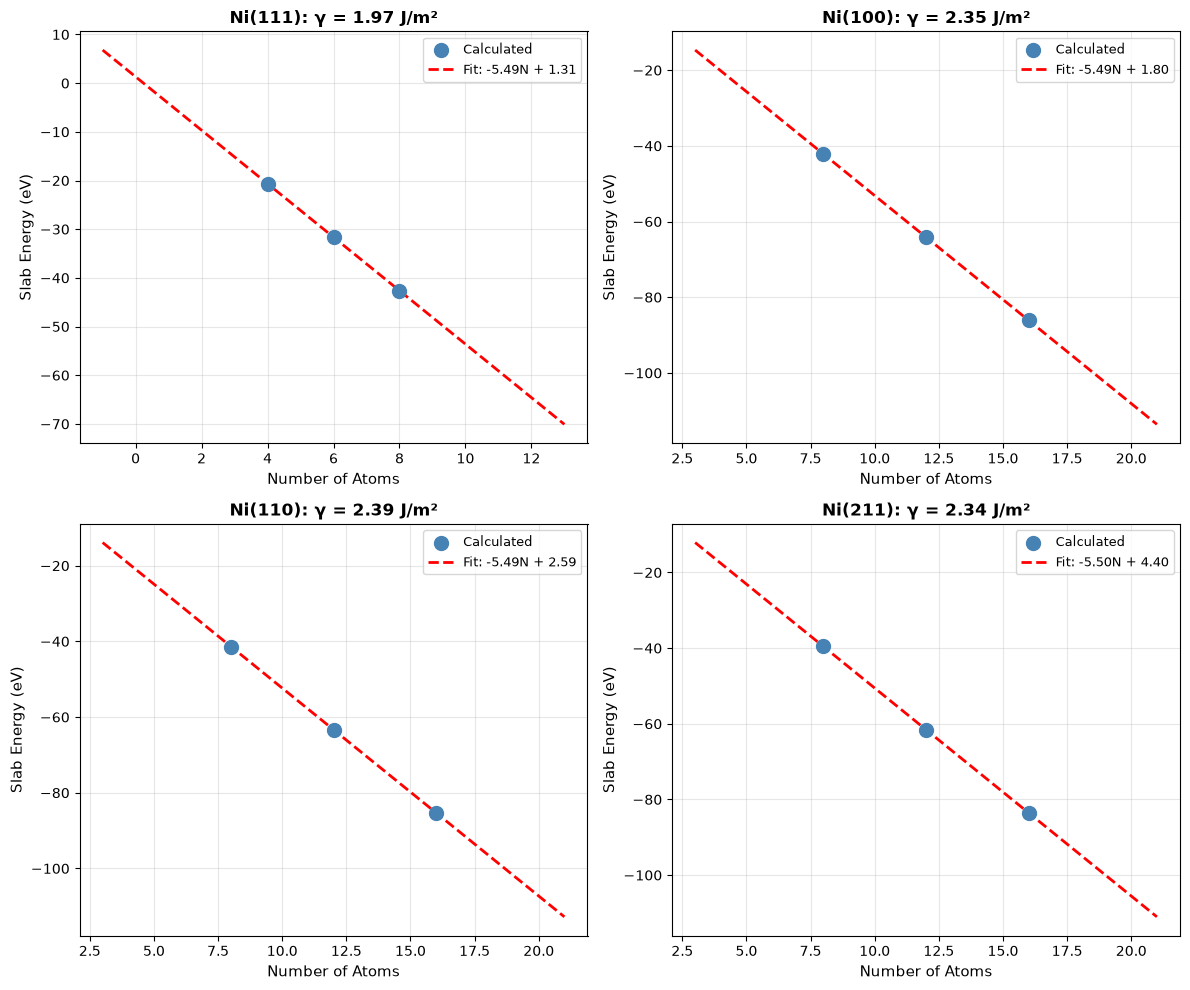
Step 4: Compare with Literature
Finally, let’s compare our calculated surface energies with DFT literature values:
print(f"\n{'='*70}")
print("Comparison with DFT Literature (Tran et al., 2016)")
print(f"{'='*70}")
lit_values = {
    (1, 1, 1): 1.92,
    (1, 0, 0): 2.21,
    (1, 1, 0): 2.29,
    (2, 1, 1): 2.24,
}  # J/m²

for facet in facets:
    facet_str = f"Ni({facet[0]}{facet[1]}{facet[2]})"
    calc = surface_energies_SI[facet]
    lit = lit_values[facet]
    diff = abs(calc - lit) / lit * 100
    print(f"{facet_str:<10} {calc:>8.2f} J/m²  (Lit: {lit:.2f}, Δ={diff:.1f}%)")
======================================================================
Comparison with DFT Literature (Tran et al., 2016)
======================================================================
Ni(111)        1.97 J/m²  (Lit: 1.92, Δ=2.4%)
Ni(100)        2.35 J/m²  (Lit: 2.21, Δ=6.4%)
Ni(110)        2.39 J/m²  (Lit: 2.29, Δ=4.2%)
Ni(211)        2.34 J/m²  (Lit: 2.24, Δ=4.5%)
Explore on Your Own
Thickness convergence: Add 10 and 12 layer calculations. Is the linear fit still valid?
Constraint effects: Fix the bottom 2 layers during relaxation. How does this affect γ?
Vacuum size: Vary
min_vacuum_sizefrom 8 to 15 Å. When does γ converge?High-index facets: Try (311) or (331) surfaces. Are they more or less stable?
Alternative fitting: Use polynomial (degree 2) instead of linear fit. Does the intercept change?
Part 3: Wulff Construction
Introduction
The Wulff construction predicts the equilibrium shape of a crystalline particle by minimizing total surface energy. This determines the morphology of supported catalyst nanoparticles.
Theory
The Wulff theorem states that at equilibrium, the distance from the particle center to a facet is proportional to its surface energy:
Facets with lower surface energy have larger areas in the equilibrium shape.
Step 1: Prepare Surface Energies
We’ll use the surface energies calculated in Part 2 to construct the Wulff shape:
print("\nConstructing Wulff Shape")
print("=" * 50)

# Use optimized bulk structure
adaptor = AseAtomsAdaptor()
ni_structure = adaptor.get_structure(ni_bulk)

miller_list = list(surface_energies_SI.keys())
energy_list = [surface_energies_SI[m] for m in miller_list]

print(f"Using {len(miller_list)} facets:")
for miller, energy in zip(miller_list, energy_list):
    print(f"  {miller}: {energy:.2f} J/m²")
Constructing Wulff Shape
==================================================
Using 4 facets:
  (1, 1, 1): 1.97 J/m²
  (1, 0, 0): 2.35 J/m²
  (1, 1, 0): 2.39 J/m²
  (2, 1, 1): 2.34 J/m²
Step 2: Generate Wulff Construction
Now we create the Wulff shape and analyze its properties:
# Create Wulff shape
wulff = WulffShape(ni_structure.lattice, miller_list, energy_list)

# Print properties
print(f"\nWulff Shape Properties:")
print(f"  Volume:          {wulff.volume:.2f} ų")
print(f"  Surface area:    {wulff.surface_area:.2f} Ų")
print(f"  Effective radius: {wulff.effective_radius:.2f} Å")
print(f"  Weighted γ:      {wulff.weighted_surface_energy:.2f} J/m²")

# Area fractions
print(f"\nFacet Area Fractions:")
area_frac = wulff.area_fraction_dict
for hkl, frac in sorted(area_frac.items(), key=lambda x: x[1], reverse=True):
    print(f"  {hkl}: {frac*100:.1f}%")
Wulff Shape Properties:
  Volume:          47.94 ų
  Surface area:    70.12 Ų
  Effective radius: 2.25 Å
  Weighted γ:      2.05 J/m²

Facet Area Fractions:
  (1, 1, 1): 78.1%
  (1, 0, 0): 18.3%
  (1, 1, 0): 1.9%
  (2, 1, 1): 1.7%
Step 3: Visualize and Compare
Let’s visualize the Wulff shape and compare with literature:
# Visualize
fig = wulff.get_plot()
plt.title("Wulff Construction: Ni Nanoparticle", fontsize=14)
plt.tight_layout()
plt.savefig(
    str(output_dir / part_dirs["part3"] / "wulff_shape.png"),
    dpi=300,
    bbox_inches="tight",
)
plt.show()

# Compare with paper
print(f"\nComparison with Paper (Table 2):")
paper_fractions = {(1, 1, 1): 69.23, (1, 0, 0): 21.10, (1, 1, 0): 5.28, (2, 1, 1): 4.39}
for hkl in miller_list:
    calc_frac = area_frac.get(hkl, 0) * 100
    paper_frac = paper_fractions.get(hkl, 0)
    print(f"  {hkl}: {calc_frac:>6.1f}% (Paper: {paper_frac:.1f}%)")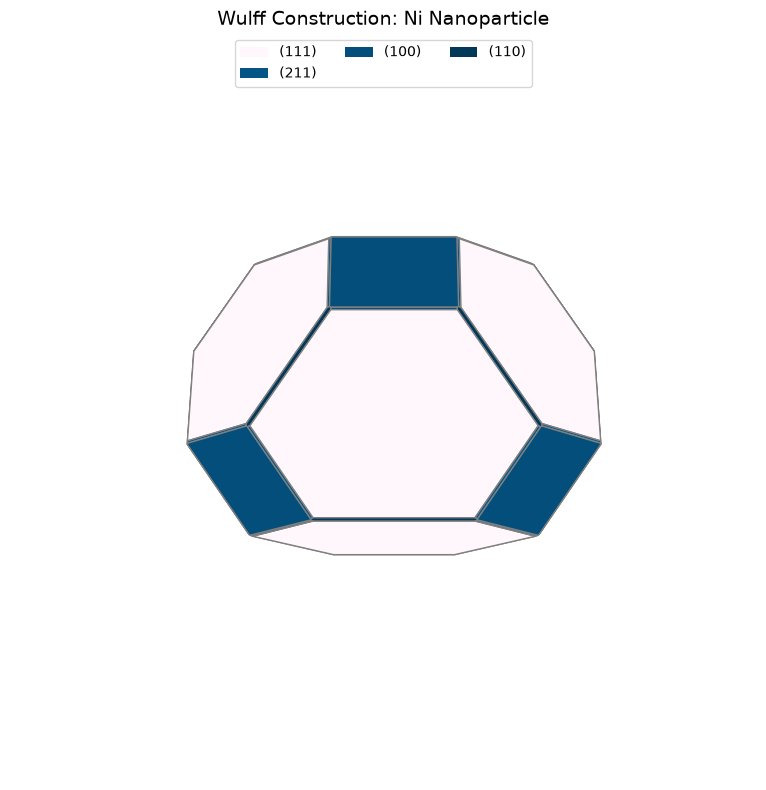
Comparison with Paper (Table 2):
  (1, 1, 1):   78.1% (Paper: 69.2%)
  (1, 0, 0):   18.3% (Paper: 21.1%)
  (1, 1, 0):    1.9% (Paper: 5.3%)
  (2, 1, 1):    1.7% (Paper: 4.4%)
Explore on Your Own
Particle size effects: How would including edge/corner energies modify the shape?
Anisotropic strain: Apply 2% compressive strain to the lattice. How does the shape change?
Temperature effects: Surface energies decrease with T. Estimate γ(T) and recompute Wulff shape.
Alloy nanoparticles: Replace some Ni with Cu or Au. How would segregation affect the shape?
Support effects: Some facets interact more strongly with supports. Model this by reducing their γ.
Part 4: H Adsorption Energy with ZPE Correction
Introduction
Hydrogen adsorption is a fundamental step in many catalytic reactions (hydrogenation, dehydrogenation, etc.). We’ll calculate the binding energy with vibrational zero-point energy (ZPE) corrections.
Theory
The adsorption energy is:
ZPE correction accounts for quantum vibrational effects:
The ZPE correction is calculated by analyzing the vibrational modes of the molecule/adsorbate.
Step 1: Setup and Relax Clean Slab
First, we create the Ni(111) surface and relax it:
# Create Ni(111) slab
ni_bulk_atoms = bulk("Ni", "fcc", a=a_opt, cubic=True)
ni_bulk_obj = Bulk(bulk_atoms=ni_bulk_atoms)
ni_slabs = Slab.from_bulk_get_specific_millers(
    bulk=ni_bulk_obj, specific_millers=(1, 1, 1)
)
ni_slab = ni_slabs[0].atoms

print(f"   Created {len(ni_slab)} atom slab")

# Set up calculators
calc = FAIRChemCalculator(predictor, task_name="oc20")
d3_calc = TorchDFTD3Calculator(device="cpu", damping="bj")
print("   Calculators initialized (ML + D3)")
Created 96 atom slab
Calculators initialized (ML + D3)
Step 2: Relax Clean Slab
Relax the bare Ni(111) surface as our reference:
print("\n1. Relaxing clean Ni(111) slab...")
clean_slab = ni_slab.copy()
clean_slab.set_pbc([True, True, True])
clean_slab.calc = calc

opt = LBFGS(
    clean_slab,
    trajectory=str(output_dir / part_dirs["part4"] / "ni111_clean.traj"),
    logfile=str(output_dir / part_dirs["part4"] / "ni111_clean.log"),
)
opt.run(fmax=0.05, steps=relaxation_steps)

E_clean_ml = clean_slab.get_potential_energy()
clean_slab.calc = d3_calc
E_clean_d3 = clean_slab.get_potential_energy()
E_clean = E_clean_ml + E_clean_d3
print(f"   E(clean): {E_clean:.2f} eV (ML: {E_clean_ml:.2f}, D3: {E_clean_d3:.2f})")

# Save clean slab
ase.io.write(str(output_dir / part_dirs["part4"] / "ni111_clean.xyz"), clean_slab)
print("   ✓ Clean slab relaxed and saved")
WARNING:root:The UMA fast path (merge_mole + compile) is only available for fixed composition, task, charge, and spin. This is optimized for MD applications. Falling back to a less optimized version for subsequent evaluations. Reason: 'Dataset differs: ['omat'] vs ['oc20']'.
Use inference_settings='batch' for heterogeneous batched evaluations.
1. Relaxing clean Ni(111) slab...
/home/runner/work/_tool/Python/3.12.14/x64/lib/python3.12/site-packages/torch_dftd/torch_dftd3_calculator.py:98: UserWarning: Creating a tensor from a list of numpy.ndarrays is extremely slow. Please consider converting the list to a single numpy.ndarray with numpy.array() before converting to a tensor. (Triggered internally at /__w/pytorch/pytorch/torch/csrc/utils/tensor_new.cpp:252.)
  cell: Optional[Tensor] = torch.tensor(
   E(clean): -487.48 eV (ML: -450.70, D3: -36.79)
   ✓ Clean slab relaxed and saved
Step 3: Generate H Adsorption Sites
Use heuristic placement to generate multiple candidate H adsorption sites:
print("\n2. Generating 5 H adsorption sites...")
ni_slab_for_ads = ni_slabs[0]
ni_slab_for_ads.atoms = clean_slab.copy()

adsorbate_h = Adsorbate(adsorbate_smiles_from_db="*H")
ads_slab_config = AdsorbateSlabConfig(
    ni_slab_for_ads,
    adsorbate_h,
    mode="random_site_heuristic_placement",
    num_sites=num_sites,
)

print(f"   Generated {len(ads_slab_config.atoms_list)} initial configurations")
print("   These include fcc, hcp, bridge, and top sites")
2. Generating 5 H adsorption sites...
   Generated 2 initial configurations
   These include fcc, hcp, bridge, and top sites
/home/runner/work/_tool/Python/3.12.14/x64/lib/python3.12/site-packages/fairchem/data/oc/core/adsorbate.py:79: UserWarning: Loading data from a pickle file. Pickle files can execute arbitrary code and should only be loaded from trusted sources. Consider migrating to a safer format such as Parquet, CSV, or JSON.
  adsorbate_db = safe_pickle_load(fp)
Step 4: Relax All H Configurations
Relax each configuration and identify the most stable site:
print("\n3. Relaxing all H adsorption configurations...")
h_energies = []
h_configs = []
h_d3_energies = []

for idx, config in enumerate(ads_slab_config.atoms_list):
    config_relaxed = config.copy()
    config_relaxed.set_pbc([True, True, True])
    config_relaxed.calc = calc

    opt = LBFGS(
        config_relaxed,
        trajectory=str(output_dir / part_dirs["part4"] / f"h_site_{idx+1}.traj"),
        logfile=str(output_dir / part_dirs["part4"] / f"h_site_{idx+1}.log"),
    )
    opt.run(fmax=0.05, steps=relaxation_steps)

    E_ml = config_relaxed.get_potential_energy()
    config_relaxed.calc = d3_calc
    E_d3 = config_relaxed.get_potential_energy()
    E_total = E_ml + E_d3

    h_energies.append(E_total)
    h_configs.append(config_relaxed)
    h_d3_energies.append(E_d3)
    print(f"   Config {idx+1}: {E_total:.2f} eV (ML: {E_ml:.2f}, D3: {E_d3:.2f})")

    # Save structure
    ase.io.write(
        str(output_dir / part_dirs["part4"] / f"h_site_{idx+1}.xyz"), config_relaxed
    )

# Select best configuration
best_idx = np.argmin(h_energies)
slab_with_h = h_configs[best_idx]
E_with_h = h_energies[best_idx]
E_with_h_d3 = h_d3_energies[best_idx]

print(f"\n   ✓ Best site: Config {best_idx+1}, E = {E_with_h:.2f} eV")
print(f"   Energy spread: {max(h_energies) - min(h_energies):.2f} eV")
print(f"   This spread indicates the importance of testing multiple sites!")
3. Relaxing all H adsorption configurations...
Config 1: -491.55 eV (ML: -454.69, D3: -36.87)
   Config 2: -491.39 eV (ML: -454.52, D3: -36.87)

   ✓ Best site: Config 1, E = -491.55 eV
   Energy spread: 0.17 eV
   This spread indicates the importance of testing multiple sites!
Step 5: Calculate H₂ Reference Energy
We need the H₂ molecule energy as a reference:
print("\n4. Calculating H₂ reference energy...")
h2 = Atoms("H2", positions=[[0, 0, 0], [0, 0, 0.74]])
h2.center(vacuum=10.0)
h2.set_pbc([True, True, True])
h2.calc = calc

opt = LBFGS(
    h2,
    trajectory=str(output_dir / part_dirs["part4"] / "h2.traj"),
    logfile=str(output_dir / part_dirs["part4"] / "h2.log"),
)
opt.run(fmax=0.05, steps=relaxation_steps)

E_h2_ml = h2.get_potential_energy()
h2.calc = d3_calc
E_h2_d3 = h2.get_potential_energy()
E_h2 = E_h2_ml + E_h2_d3
print(f"   E(H₂): {E_h2:.2f} eV (ML: {E_h2_ml:.2f}, D3: {E_h2_d3:.2f})")

# Save H2 structure
ase.io.write(str(output_dir / part_dirs["part4"] / "h2_optimized.xyz"), h2)
4. Calculating H₂ reference energy...
E(H₂): -6.94 eV (ML: -6.94, D3: -0.00)
Step 6: Compute Adsorption Energy
Calculate the adsorption energy using the formula: E_ads = E(slab+H) - E(slab) - 0.5×E(H₂)
print(f"\n4. Computing Adsorption Energy:")
print("   E_ads = E(slab+H) - E(slab) - 0.5×E(H₂)")

E_ads = E_with_h - E_clean - 0.5 * E_h2
E_ads_no_d3 = (E_with_h - E_with_h_d3) - (E_clean - E_clean_d3) - 0.5 * (E_h2 - E_h2_d3)

print(f"\n   Without D3: {E_ads_no_d3:.2f} eV")
print(f"   With D3:    {E_ads:.2f} eV")
print(f"   D3 effect:  {E_ads - E_ads_no_d3:.2f} eV")
print(f"\n   → D3 corrections are negligible for H* (small, covalent bonding)")
4. Computing Adsorption Energy:
   E_ads = E(slab+H) - E(slab) - 0.5×E(H₂)

   Without D3: -0.52 eV
   With D3:    -0.60 eV
   D3 effect:  -0.08 eV

   → D3 corrections are negligible for H* (small, covalent bonding)
Step 7: Zero-Point Energy (ZPE) Corrections
Calculate vibrational frequencies to get ZPE corrections:
print("\n6. Computing ZPE corrections...")
print("   This accounts for quantum vibrational effects")
h_index = len(slab_with_h) - 1
slab_with_h.calc = calc
vib = Vibrations(slab_with_h, indices=[h_index], delta=0.02)
vib.run()
vib_energies = vib.get_energies()
zpe_ads = np.sum(vib_energies) / 2.0

h2.calc = calc
vib_h2 = Vibrations(h2, indices=[0, 1], delta=0.02)
vib_h2.run()
vib_energies_h2 = vib_h2.get_energies()
zpe_h2 = np.sum(vib_energies_h2) / 2.0

E_ads_zpe = E_ads + zpe_ads - 0.5 * zpe_h2

print(f"   ZPE(H*):  {zpe_ads:.2f} eV")
print(f"   ZPE(H₂):  {zpe_h2:.2f} eV")
print(f"   E_ads(ZPE): {E_ads_zpe:.2f} eV")

# Visualize vibrational modes
print("\n   Creating animations of vibrational modes...")
vib.write_mode(n=0)
ase.io.write("vib.0.gif", ase.io.read("vib.0.traj@:"), rotation=("-45x,0y,0z"))

vib.clean()
vib_h2.clean()
6. Computing ZPE corrections...
   This accounts for quantum vibrational effects
   ZPE(H*):  0.18+0.00j eV
   ZPE(H₂):  0.28+0.00j eV
   E_ads(ZPE): -0.56-0.00j eV

   Creating animations of vibrational modes...
0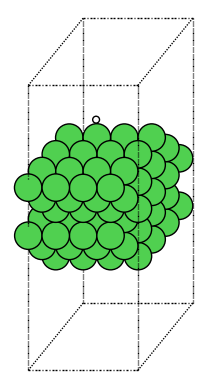
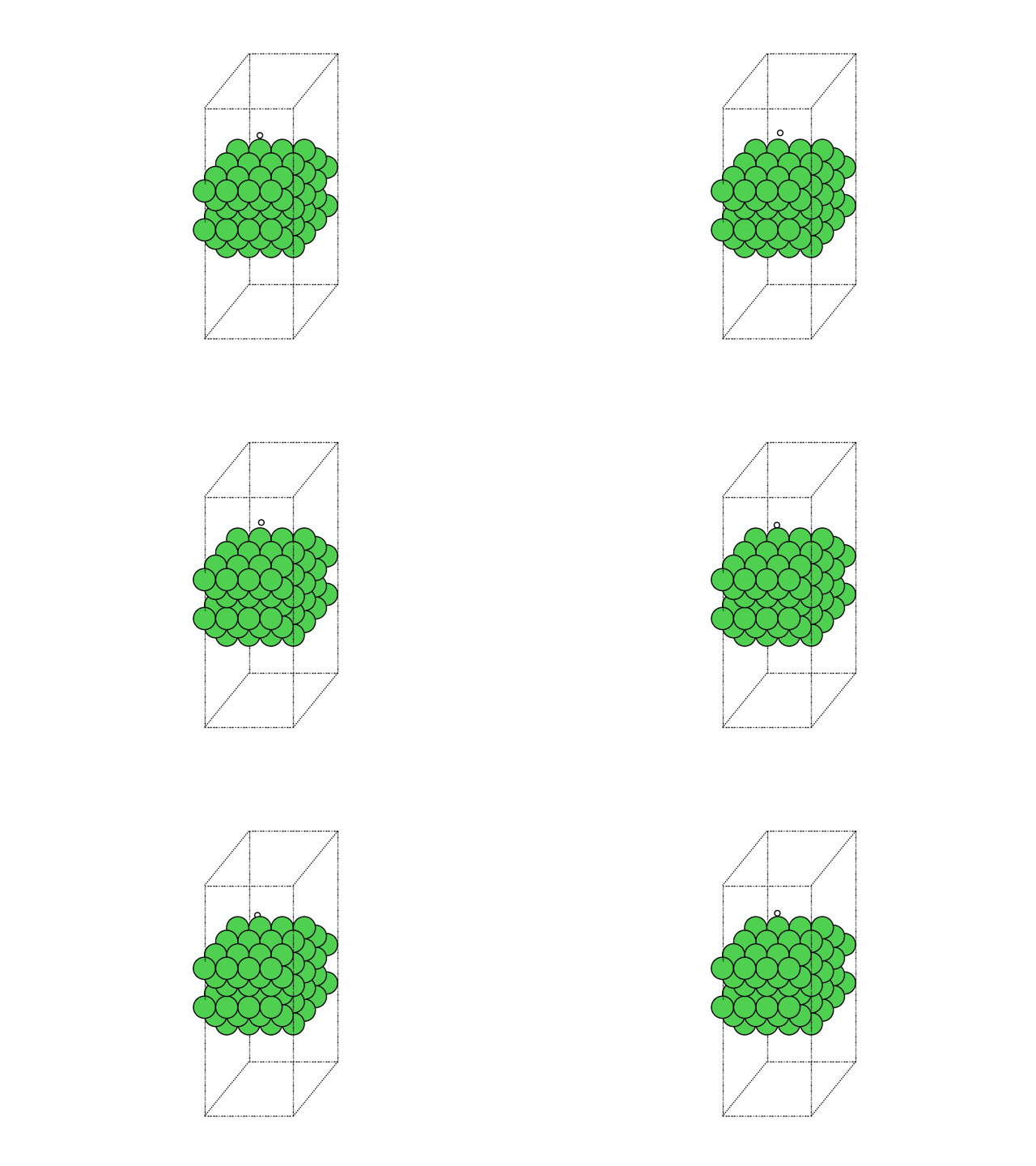
Step 8: Visualize and Compare Results
Visualize the best configuration and compare with literature:
print("\n7. Visualizing best H* configuration...")
view(slab_with_h, viewer='x3d')
7. Visualizing best H* configuration...
# 6. Compare with literature
print(f"\n{'='*60}")
print("Comparison with Literature:")
print(f"{'='*60}")
print("Table 4 (DFT): -0.60 eV (Ni(111), ref H₂)")
print(f"This work:     {E_ads_zpe:.2f} eV")
print(f"Difference:    {abs(E_ads_zpe - (-0.60)):.2f} eV")
============================================================
Comparison with Literature:
============================================================
Table 4 (DFT): -0.60 eV (Ni(111), ref H₂)
This work:     -0.56-0.00j eV
Difference:    0.04 eV
Explore on Your Own
Site preference: Identify which site (fcc, hcp, bridge, top) the H prefers. Visualize with
view(atoms, viewer='x3d').Coverage effects: Place 2 H atoms on the slab. How does binding change with separation?
Different facets: Compare H adsorption on (100) and (110) surfaces. Which is strongest?
Subsurface H: Place H below the surface layer. Is it stable?
ZPE uncertainty: How sensitive is E_ads to the vibrational delta parameter (try 0.01, 0.03 Å)?
Part 5: Coverage-Dependent H Adsorption
Introduction
At higher coverages, adsorbate-adsorbate interactions become significant. We’ll study how H binding energy changes from dilute (1 atom) to saturated (full monolayer) coverage.
Theory
The differential adsorption energy at coverage θ is:
For many systems, this varies linearly:
where β quantifies lateral interactions (repulsive if β > 0).
Step 1: Setup Slab and Calculators
Create a larger Ni(111) slab to accommodate multiple adsorbates:
# Create large Ni(111) slab
ni_bulk_atoms = bulk("Ni", "fcc", a=a_opt, cubic=True)
ni_bulk_obj = Bulk(bulk_atoms=ni_bulk_atoms)
ni_slabs = Slab.from_bulk_get_specific_millers(
    bulk=ni_bulk_obj, specific_millers=(1, 1, 1)
)
slab = ni_slabs[0].atoms.copy()

print(f"   Created {len(slab)} atom slab")

# Set up calculators
base_calc = FAIRChemCalculator(predictor, task_name="oc20")
d3_calc = TorchDFTD3Calculator(device="cpu", damping="bj")
print("   ✓ Calculators initialized")
Created 96 atom slab
✓ Calculators initialized
Step 2: Calculate Reference Energies
Get reference energies for clean surface and H₂:
print("\n1. Relaxing clean slab...")
clean_slab = slab.copy()
clean_slab.pbc = True
clean_slab.calc = base_calc

opt = LBFGS(
    clean_slab,
    trajectory=str(output_dir / part_dirs["part5"] / "ni111_clean.traj"),
    logfile=str(output_dir / part_dirs["part5"] / "ni111_clean.log"),
)
opt.run(fmax=0.05, steps=relaxation_steps)

E_clean_ml = clean_slab.get_potential_energy()
clean_slab.calc = d3_calc
E_clean_d3 = clean_slab.get_potential_energy()
E_clean = E_clean_ml + E_clean_d3
print(f"   E(clean): {E_clean:.2f} eV")

print("\n2. Calculating H₂ reference...")
h2 = Atoms("H2", positions=[[0, 0, 0], [0, 0, 0.74]])
h2.center(vacuum=10.0)
h2.set_pbc([True, True, True])
h2.calc = base_calc

opt = LBFGS(
    h2,
    trajectory=str(output_dir / part_dirs["part5"] / "h2.traj"),
    logfile=str(output_dir / part_dirs["part5"] / "h2.log"),
)
opt.run(fmax=0.05, steps=relaxation_steps)

E_h2_ml = h2.get_potential_energy()
h2.calc = d3_calc
E_h2_d3 = h2.get_potential_energy()
E_h2 = E_h2_ml + E_h2_d3
print(f"   E(H₂): {E_h2:.2f} eV")
1. Relaxing clean slab...
   E(clean): -487.48 eV

2. Calculating H₂ reference...
E(H₂): -6.94 eV
Step 3: Set Up Coverage Study
Define the coverages we’ll test (from dilute to nearly 1 ML):
# Count surface sites
tags = slab.get_tags()
n_sites = np.sum(tags == 1)
print(f"\n3. Surface sites: {n_sites} (4×4 Ni(111))")

# Test coverages: 1 H, 0.25 ML, 0.5 ML, 0.75 ML, 1.0 ML
coverages_to_test = [1, 4, 8, 12, 16]
print(f"\n   Will test coverages: {[f'{n/n_sites:.2f} ML' for n in coverages_to_test]}")
print("   This spans from dilute to nearly full monolayer")

coverages = []
adsorption_energies = []
3. Surface sites: 16 (4×4 Ni(111))

   Will test coverages: ['0.06 ML', '0.25 ML', '0.50 ML', '0.75 ML', '1.00 ML']
   This spans from dilute to nearly full monolayer
Step 4: Generate and Relax Configurations at Each Coverage
For each coverage, generate multiple configurations and find the lowest energy:
for n_h in coverages_to_test:
    print(f"\n3. Coverage: {n_h} H ({n_h/n_sites:.2f} ML)")

    # Generate configurations
    ni_bulk_obj_h = Bulk(bulk_atoms=ni_bulk_atoms)
    ni_slabs_h = Slab.from_bulk_get_specific_millers(
        bulk=ni_bulk_obj_h, specific_millers=(1, 1, 1)
    )
    slab_for_ads = ni_slabs_h[0]
    slab_for_ads.atoms = clean_slab.copy()

    adsorbates_list = [Adsorbate(adsorbate_smiles_from_db="*H") for _ in range(n_h)]

    try:
        multi_ads_config = MultipleAdsorbateSlabConfig(
            slab_for_ads, adsorbates_list, num_configurations=num_sites
        )
    except ValueError as e:
        print(f"   ⚠ Configuration generation failed: {e}")
        continue

    if len(multi_ads_config.atoms_list) == 0:
        print(f"   ⚠ No configurations generated")
        continue

    print(f"   Generated {len(multi_ads_config.atoms_list)} configurations")

    # Relax each and find best
    config_energies = []

    for idx, config in enumerate(multi_ads_config.atoms_list):
        config_relaxed = config.copy()
        config_relaxed.set_pbc([True, True, True])
        config_relaxed.calc = base_calc

        opt = LBFGS(config_relaxed, logfile=None)
        opt.run(fmax=0.05, steps=relaxation_steps)

        E_ml = config_relaxed.get_potential_energy()
        config_relaxed.calc = d3_calc
        E_d3 = config_relaxed.get_potential_energy()
        E_total = E_ml + E_d3

        config_energies.append(E_total)
        print(f"     Config {idx+1}: {E_total:.2f} eV")

    best_idx = np.argmin(config_energies)
    best_energy = config_energies[best_idx]
    best_config = multi_ads_config.atoms_list[best_idx]
    E_ads_per_h = (best_energy - E_clean - n_h * 0.5 * E_h2) / n_h

    coverage = n_h / n_sites
    coverages.append(coverage)
    adsorption_energies.append(E_ads_per_h)

    print(f"   → E_ads/H: {E_ads_per_h:.2f} eV")

    # Visualize best configuration at this coverage
    print(f"   Visualizing configuration with {n_h} H atoms...")
    view(best_config, viewer='x3d')

print(f"\n✓ Completed coverage study: {len(coverages)} data points")
3. Coverage: 1 H (0.06 ML)
/home/runner/work/_tool/Python/3.12.14/x64/lib/python3.12/site-packages/fairchem/data/oc/core/adsorbate.py:79: UserWarning: Loading data from a pickle file. Pickle files can execute arbitrary code and should only be loaded from trusted sources. Consider migrating to a safer format such as Parquet, CSV, or JSON.
  adsorbate_db = safe_pickle_load(fp)
Generated 2 configurations
Config 1: -491.55 eV
     Config 2: -491.55 eV
   → E_ads/H: -0.60 eV
   Visualizing configuration with 1 H atoms...

3. Coverage: 4 H (0.25 ML)
/home/runner/work/_tool/Python/3.12.14/x64/lib/python3.12/site-packages/fairchem/data/oc/core/adsorbate.py:79: UserWarning: Loading data from a pickle file. Pickle files can execute arbitrary code and should only be loaded from trusted sources. Consider migrating to a safer format such as Parquet, CSV, or JSON.
  adsorbate_db = safe_pickle_load(fp)
Generated 2 configurations
Config 1: -503.71 eV
     Config 2: -503.46 eV
   → E_ads/H: -0.59 eV
   Visualizing configuration with 4 H atoms...

3. Coverage: 8 H (0.50 ML)
/home/runner/work/_tool/Python/3.12.14/x64/lib/python3.12/site-packages/fairchem/data/oc/core/adsorbate.py:79: UserWarning: Loading data from a pickle file. Pickle files can execute arbitrary code and should only be loaded from trusted sources. Consider migrating to a safer format such as Parquet, CSV, or JSON.
  adsorbate_db = safe_pickle_load(fp)
Generated 2 configurations
Config 1: -518.90 eV
     Config 2: -517.94 eV
   → E_ads/H: -0.46 eV
   Visualizing configuration with 8 H atoms...

3. Coverage: 12 H (0.75 ML)
/home/runner/work/_tool/Python/3.12.14/x64/lib/python3.12/site-packages/fairchem/data/oc/core/adsorbate.py:79: UserWarning: Loading data from a pickle file. Pickle files can execute arbitrary code and should only be loaded from trusted sources. Consider migrating to a safer format such as Parquet, CSV, or JSON.
  adsorbate_db = safe_pickle_load(fp)
Generated 2 configurations
Config 1: -534.29 eV
     Config 2: -532.31 eV
   → E_ads/H: -0.43 eV
   Visualizing configuration with 12 H atoms...

3. Coverage: 16 H (1.00 ML)
/home/runner/work/_tool/Python/3.12.14/x64/lib/python3.12/site-packages/fairchem/data/oc/core/adsorbate.py:79: UserWarning: Loading data from a pickle file. Pickle files can execute arbitrary code and should only be loaded from trusted sources. Consider migrating to a safer format such as Parquet, CSV, or JSON.
  adsorbate_db = safe_pickle_load(fp)
Generated 2 configurations
Config 1: -548.13 eV
     Config 2: -546.52 eV
   → E_ads/H: -0.32 eV
   Visualizing configuration with 16 H atoms...

✓ Completed coverage study: 5 data points
Step 5: Perform Linear Fit
Fit E_ads vs coverage to extract the slope (lateral interaction strength):
print("\n4. Performing linear fit to coverage dependence...")

# Linear fit
from numpy.polynomial import Polynomial

p = Polynomial.fit(coverages, adsorption_energies, 1)
slope = p.coef[1]
intercept = p.coef[0]

print(f"\n{'='*60}")
print(f"Linear Fit: E_ads = {intercept:.2f} + {slope:.2f}θ (eV)")
print(f"Slope: {slope * 96.485:.1f} kJ/mol per ML")
print(f"Paper: 8.7 kJ/mol per ML")
print(f"{'='*60}")
4. Performing linear fit to coverage dependence...

============================================================
Linear Fit: E_ads = -0.47 + 0.14θ (eV)
Slope: 13.8 kJ/mol per ML
Paper: 8.7 kJ/mol per ML
============================================================
Step 6: Visualize Coverage Dependence
Create a plot showing how adsorption energy changes with coverage:
print("\n5. Plotting coverage dependence...")

# Plot
fig, ax = plt.subplots(figsize=(8, 6))
ax.scatter(
    coverages,
    adsorption_energies,
    s=100,
    marker="o",
    label="Calculated",
    zorder=3,
    color="steelblue",
)

cov_fit = np.linspace(0, max(coverages), 100)
ads_fit = p(cov_fit)
ax.plot(
    cov_fit, ads_fit, "r--", label=f"Fit: {intercept:.2f} + {slope:.2f}θ", linewidth=2
)

ax.set_xlabel("H Coverage (ML)", fontsize=12)
ax.set_ylabel("Adsorption Energy (eV/H)", fontsize=12)
ax.set_title("Coverage-Dependent H Adsorption on Ni(111)", fontsize=14)
ax.legend(fontsize=11)
ax.grid(True, alpha=0.3)
plt.tight_layout()
plt.savefig(str(output_dir / part_dirs["part5"] / "coverage_dependence.png"), dpi=300)
plt.show()

print("\n✓ Coverage dependence analysis complete!")
5. Plotting coverage dependence...
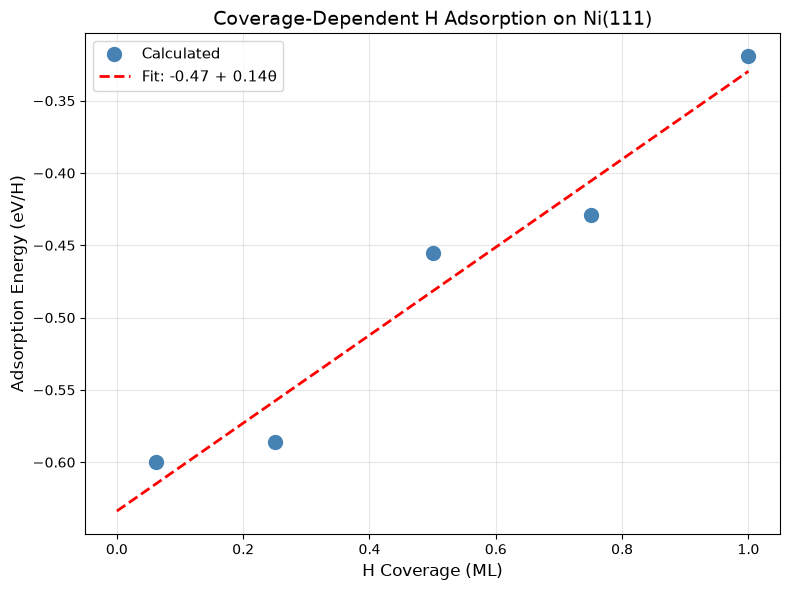
✓ Coverage dependence analysis complete!
Explore on Your Own
Non-linear behavior: Use polynomial (degree 2) fit. Is there curvature at high coverage?
Temperature effects: Estimate configurational entropy at each coverage. How does this affect free energy?
Pattern formation: Visualize the lowest-energy configuration at 0.5 ML. Are H atoms ordered?
Other adsorbates: Repeat for O or N. How do lateral interactions compare?
Phase diagrams: At what coverage do you expect phase separation (islands vs uniform)?
Part 6: CO Formation/Dissociation Thermochemistry and Barrier
Introduction
CO dissociation (CO* → C* + O*) is the rate-limiting step in many catalytic processes (Fischer-Tropsch, CO oxidation, etc.). We’ll calculate the reaction energy for C* + O* → CO* and the activation barriers in both directions using the nudged elastic band (NEB) method.
Theory
Forward Reaction: C* + O* → CO* + * (recombination)
Reverse Reaction: CO* + → C + O* (dissociation)
Thermochemistry:
Barrier: NEB finds the minimum energy path (MEP) and transition state:
Step 1: Setup Slab and Calculators
Initialize the Ni(111) surface and calculators:
# Create slab
ni_bulk_atoms = bulk("Ni", "fcc", a=a_opt, cubic=True)
ni_bulk_obj = Bulk(bulk_atoms=ni_bulk_atoms)
ni_slabs = Slab.from_bulk_get_specific_millers(
    bulk=ni_bulk_obj, specific_millers=(1, 1, 1)
)
slab = ni_slabs[0].atoms

print(f"   Created {len(slab)} atom slab")

base_calc = FAIRChemCalculator(predictor, task_name="oc20")
d3_calc = TorchDFTD3Calculator(device="cpu", damping="bj")
print("   \u2713 Calculators initialized")
Created 96 atom slab
✓ Calculators initialized
Step 2: Generate and Relax Final State (CO*)
Find the most stable CO adsorption configuration (this is the product of C+O recombination):
print("\n1. Final State: CO* on Ni(111)")
print("   Generating CO adsorption configurations...")

ni_bulk_obj_co = Bulk(bulk_atoms=ni_bulk_atoms)
ni_slab_co = Slab.from_bulk_get_specific_millers(
    bulk=ni_bulk_obj_co, specific_millers=(1, 1, 1)
)[0]
ni_slab_co.atoms = slab.copy()

adsorbate_co = Adsorbate(adsorbate_smiles_from_db="*CO")
multi_ads_config_co = MultipleAdsorbateSlabConfig(
    ni_slab_co, [adsorbate_co], num_configurations=num_sites
)

print(f"   Generated {len(multi_ads_config_co.atoms_list)} configurations")

# Relax and find best
co_energies = []
co_energies_ml = []
co_energies_d3 = []
co_configs = []

for idx, config in enumerate(multi_ads_config_co.atoms_list):
    config_relaxed = config.copy()
    config_relaxed.set_pbc([True, True, True])
    config_relaxed.calc = base_calc
    opt = LBFGS(config_relaxed, logfile=None)
    opt.run(fmax=0.05, steps=relaxation_steps)

    E_ml = config_relaxed.get_potential_energy()
    config_relaxed.calc = d3_calc
    E_d3 = config_relaxed.get_potential_energy()
    E_total = E_ml + E_d3

    co_energies.append(E_total)
    co_energies_ml.append(E_ml)
    co_energies_d3.append(E_d3)
    co_configs.append(config_relaxed)
    print(
        f"     Config {idx+1}: E_total = {E_total:.2f} eV (RPBE: {E_ml:.2f}, D3: {E_d3:.2f})"
    )

best_co_idx = np.argmin(co_energies)
final_co = co_configs[best_co_idx]
E_final_co = co_energies[best_co_idx]
E_final_co_ml = co_energies_ml[best_co_idx]
E_final_co_d3 = co_energies_d3[best_co_idx]

print(f"\n   → Best CO* (Config {best_co_idx+1}):")
print(f"      RPBE:  {E_final_co_ml:.2f} eV")
print(f"      D3:    {E_final_co_d3:.2f} eV")
print(f"      Total: {E_final_co:.2f} eV")

# Save best CO state
ase.io.write(str(output_dir / part_dirs["part6"] / "co_final_best.traj"), final_co)
print("   ✓ Best CO* structure saved")

# Visualize best CO* structure
print("\n   Visualizing best CO* structure...")
view(final_co, viewer='x3d')
1. Final State: CO* on Ni(111)
   Generating CO adsorption configurations...
/home/runner/work/_tool/Python/3.12.14/x64/lib/python3.12/site-packages/fairchem/data/oc/core/adsorbate.py:79: UserWarning: Loading data from a pickle file. Pickle files can execute arbitrary code and should only be loaded from trusted sources. Consider migrating to a safer format such as Parquet, CSV, or JSON.
  adsorbate_db = safe_pickle_load(fp)
Generated 2 configurations
Config 1: E_total = -503.61 eV (RPBE: -466.55, D3: -37.06)
     Config 2: E_total = -503.87 eV (RPBE: -466.80, D3: -37.07)

   → Best CO* (Config 2):
      RPBE:  -466.80 eV
      D3:    -37.07 eV
      Total: -503.87 eV
   ✓ Best CO* structure saved

   Visualizing best CO* structure...
Step 3: Generate and Relax Initial State (C* + O*)
Find the most stable configuration for dissociated C and O (reactants):
print("\n2. Initial State: C* + O* on Ni(111)")
print("   Generating C+O configurations...")

ni_bulk_obj_c_o = Bulk(bulk_atoms=ni_bulk_atoms)
ni_slab_c_o = Slab.from_bulk_get_specific_millers(
    bulk=ni_bulk_obj_c_o, specific_millers=(1, 1, 1)
)[0]

adsorbate_c = Adsorbate(adsorbate_smiles_from_db="*C")
adsorbate_o = Adsorbate(adsorbate_smiles_from_db="*O")

multi_ads_config_c_o = MultipleAdsorbateSlabConfig(
    ni_slab_c_o, [adsorbate_c, adsorbate_o], num_configurations=num_sites
)

print(f"   Generated {len(multi_ads_config_c_o.atoms_list)} configurations")

c_o_energies = []
c_o_energies_ml = []
c_o_energies_d3 = []
c_o_configs = []

for idx, config in enumerate(multi_ads_config_c_o.atoms_list):
    config_relaxed = config.copy()
    config_relaxed.set_pbc([True, True, True])
    config_relaxed.calc = base_calc
    opt = LBFGS(config_relaxed, logfile=None)
    opt.run(fmax=0.05, steps=relaxation_steps)

    # Check C-O bond distance to ensure they haven't formed CO molecule
    c_o_dist = config_relaxed[config_relaxed.get_tags() == 2].get_distance(
        0, 1, mic=True
    )

    # CO bond length is ~1.15 Å, so if distance < 1.5 Å, they've formed a molecule
    if c_o_dist < 1.5:
        print(
            f"     Config {idx+1}: ⚠ REJECTED - C and O formed CO molecule (d = {c_o_dist:.2f} Å)"
        )
        continue

    E_ml = config_relaxed.get_potential_energy()
    config_relaxed.calc = d3_calc
    E_d3 = config_relaxed.get_potential_energy()
    E_total = E_ml + E_d3

    c_o_energies.append(E_total)
    c_o_energies_ml.append(E_ml)
    c_o_energies_d3.append(E_d3)
    c_o_configs.append(config_relaxed)
    print(
        f"     Config {idx+1}: E_total = {E_total:.2f} eV (RPBE: {E_ml:.2f}, D3: {E_d3:.2f}, C-O dist: {c_o_dist:.2f} Å)"
    )

best_c_o_idx = np.argmin(c_o_energies)
initial_c_o = c_o_configs[best_c_o_idx]
E_initial_c_o = c_o_energies[best_c_o_idx]
E_initial_c_o_ml = c_o_energies_ml[best_c_o_idx]
E_initial_c_o_d3 = c_o_energies_d3[best_c_o_idx]

print(f"\n   → Best C*+O* (Config {best_c_o_idx+1}):")
print(f"      RPBE:  {E_initial_c_o_ml:.2f} eV")
print(f"      D3:    {E_initial_c_o_d3:.2f} eV")
print(f"      Total: {E_initial_c_o:.2f} eV")

# Save best C+O state
ase.io.write(str(output_dir / part_dirs["part6"] / "co_initial_best.traj"), initial_c_o)
print("   ✓ Best C*+O* structure saved")

# Visualize best C*+O* structure
print("\n   Visualizing best C*+O* structure...")
view(initial_c_o, viewer='x3d')
2. Initial State: C* + O* on Ni(111)
   Generating C+O configurations...
/home/runner/work/_tool/Python/3.12.14/x64/lib/python3.12/site-packages/fairchem/data/oc/core/adsorbate.py:79: UserWarning: Loading data from a pickle file. Pickle files can execute arbitrary code and should only be loaded from trusted sources. Consider migrating to a safer format such as Parquet, CSV, or JSON.
  adsorbate_db = safe_pickle_load(fp)
Generated 2 configurations
Config 1: E_total = -502.79 eV (RPBE: -465.68, D3: -37.11, C-O dist: 4.28 Å)
     Config 2: E_total = -502.69 eV (RPBE: -465.58, D3: -37.11, C-O dist: 3.26 Å)

   → Best C*+O* (Config 1):
      RPBE:  -465.68 eV
      D3:    -37.11 eV
      Total: -502.79 eV
   ✓ Best C*+O* structure saved

   Visualizing best C*+O* structure...
Step 3b: Calculate C* and O* Energies Separately
Another strategy to calculate the initial energies for *C and *O at very low coverage (without interactions between the two reactants) is to do two separate relaxations.
# Clean slab
ni_bulk_obj = Bulk(bulk_atoms=ni_bulk_atoms)
clean_slab = Slab.from_bulk_get_specific_millers(
    bulk=ni_bulk_obj_c_o, specific_millers=(1, 1, 1)
)[0].atoms
clean_slab.set_pbc([True, True, True])
clean_slab.calc = base_calc
opt = LBFGS(clean_slab, logfile=None)
opt.run(fmax=0.05, steps=relaxation_steps)

E_clean_ml = clean_slab.get_potential_energy()
clean_slab.calc = d3_calc
E_clean_d3 = clean_slab.get_potential_energy()
E_clean = E_clean_ml + E_clean_d3

print(
    f"\n   Clean slab: E_total = {E_clean:.2f} eV (RPBE: {E_clean_ml:.2f}, D3: {E_clean_d3:.2f})"
)
Clean slab: E_total = -487.48 eV (RPBE: -450.70, D3: -36.79)
print(f"\n2b. Separate C* and O* Energies:")
print("    Calculating energies in separate unit cells to avoid interactions")

ni_bulk_obj_c_o = Bulk(bulk_atoms=ni_bulk_atoms)
ni_slab_c_o = Slab.from_bulk_get_specific_millers(
    bulk=ni_bulk_obj_c_o, specific_millers=(1, 1, 1)
)[0]

print("\n   Generating C* configurations...")
multi_ads_config_c = MultipleAdsorbateSlabConfig(
    ni_slab_c_o,
    adsorbates=[Adsorbate(adsorbate_smiles_from_db="*C")],
    num_configurations=num_sites,
)

c_energies = []
c_energies_ml = []
c_energies_d3 = []
c_configs = []

for idx, config in enumerate(multi_ads_config_c.atoms_list):
    config_relaxed = config.copy()
    config_relaxed.set_pbc([True, True, True])
    config_relaxed.calc = base_calc
    opt = LBFGS(config_relaxed, logfile=None)
    opt.run(fmax=0.05, steps=relaxation_steps)

    E_ml = config_relaxed.get_potential_energy()
    config_relaxed.calc = d3_calc
    E_d3 = config_relaxed.get_potential_energy()
    E_total = E_ml + E_d3

    c_energies.append(E_total)
    c_energies_ml.append(E_ml)
    c_energies_d3.append(E_d3)
    c_configs.append(config_relaxed)
    print(
        f"     Config {idx+1}: E_total = {E_total:.2f} eV (RPBE: {E_ml:.2f}, D3: {E_d3:.2f})"
    )

best_c_idx = np.argmin(c_energies)
c_ads = c_configs[best_c_idx]
E_c = c_energies[best_c_idx]
E_c_ml = c_energies_ml[best_c_idx]
E_c_d3 = c_energies_d3[best_c_idx]

print(f"\n   → Best C* (Config {best_c_idx+1}):")
print(f"      RPBE:  {E_c_ml:.2f} eV")
print(f"      D3:    {E_c_d3:.2f} eV")
print(f"      Total: {E_c:.2f} eV")

# Save best C state
ase.io.write(str(output_dir / part_dirs["part6"] / "c_best.traj"), c_ads)

# Visualize best C* structure
print("\n   Visualizing best C* structure...")
view(c_ads, viewer='x3d')

# Generate O* configuration
print("\n   Generating O* configurations...")
multi_ads_config_o = MultipleAdsorbateSlabConfig(
    ni_slab_c_o,
    adsorbates=[Adsorbate(adsorbate_smiles_from_db="*O")],
    num_configurations=num_sites,
)
o_energies = []
o_energies_ml = []
o_energies_d3 = []
o_configs = []

for idx, config in enumerate(multi_ads_config_o.atoms_list):
    config_relaxed = config.copy()
    config_relaxed.set_pbc([True, True, True])
    config_relaxed.calc = base_calc
    opt = LBFGS(config_relaxed, logfile=None)
    opt.run(fmax=0.05, steps=relaxation_steps)

    E_ml = config_relaxed.get_potential_energy()
    config_relaxed.calc = d3_calc
    E_d3 = config_relaxed.get_potential_energy()
    E_total = E_ml + E_d3

    o_energies.append(E_total)
    o_energies_ml.append(E_ml)
    o_energies_d3.append(E_d3)
    o_configs.append(config_relaxed)
    print(
        f"     Config {idx+1}: E_total = {E_total:.2f} eV (RPBE: {E_ml:.2f}, D3: {E_d3:.2f})"
    )

best_o_idx = np.argmin(o_energies)
o_ads = o_configs[best_o_idx]
E_o = o_energies[best_o_idx]
E_o_ml = o_energies_ml[best_o_idx]
E_o_d3 = o_energies_d3[best_o_idx]

print(f"\n   → Best O* (Config {best_o_idx+1}):")
print(f"      RPBE:  {E_o_ml:.2f} eV")
print(f"      D3:    {E_o_d3:.2f} eV")
print(f"      Total: {E_o:.2f} eV")

# Save best O state
ase.io.write(str(output_dir / part_dirs["part6"] / "o_best.traj"), o_ads)

# Visualize best O* structure
print("\n   Visualizing best O* structure...")
view(o_ads, viewer='x3d')

# Calculate combined energy for separate C* and O*
E_initial_c_o_separate = E_c + E_o
E_initial_c_o_separate_ml = E_c_ml + E_o_ml
E_initial_c_o_separate_d3 = E_c_d3 + E_o_d3
2b. Separate C* and O* Energies:
    Calculating energies in separate unit cells to avoid interactions
Generating C* configurations...
/home/runner/work/_tool/Python/3.12.14/x64/lib/python3.12/site-packages/fairchem/data/oc/core/adsorbate.py:79: UserWarning: Loading data from a pickle file. Pickle files can execute arbitrary code and should only be loaded from trusted sources. Consider migrating to a safer format such as Parquet, CSV, or JSON.
  adsorbate_db = safe_pickle_load(fp)
Config 1: E_total = -495.64 eV (RPBE: -458.66, D3: -36.98)
     Config 2: E_total = -495.53 eV (RPBE: -458.54, D3: -36.99)

   → Best C* (Config 1):
      RPBE:  -458.66 eV
      D3:    -36.98 eV
      Total: -495.64 eV

   Visualizing best C* structure...

   Generating O* configurations...
Config 1: E_total = -494.55 eV (RPBE: -457.67, D3: -36.88)
     Config 2: E_total = -492.89 eV (RPBE: -456.01, D3: -36.89)

   → Best O* (Config 1):
      RPBE:  -457.67 eV
      D3:    -36.88 eV
      Total: -494.55 eV

   Visualizing best O* structure...
print(f"\n   Combined C* + O* (separate calculations):")
print(f"      RPBE:  {E_initial_c_o_separate_ml:.2f} eV")
print(f"      D3:    {E_initial_c_o_separate_d3:.2f} eV")
print(f"      Total: {E_initial_c_o_separate:.2f} eV")

print(f"\n   Comparison:")
print(f"      C*+O* (same cell):  {E_initial_c_o - E_clean:.2f} eV")
print(f"      C* + O* (separate): {E_initial_c_o_separate - 2*E_clean:.2f} eV")
print(
    f"      Difference:         {(E_initial_c_o - E_clean) - (E_initial_c_o_separate - 2*E_clean):.2f} eV"
)
print("   ✓ Separate C* and O* energies calculated")
   Combined C* + O* (separate calculations):
      RPBE:  -916.33 eV
      D3:    -73.86 eV
      Total: -990.19 eV

   Comparison:
      C*+O* (same cell):  -15.31 eV
      C* + O* (separate): -15.22 eV
      Difference:         -0.09 eV
   ✓ Separate C* and O* energies calculated
Step 4: Calculate Reaction Energy with ZPE
Compute the thermochemistry for C* + O* → CO* with ZPE corrections:
print(f"\n3. Reaction Energy (C* + O* → CO*):")
print(f"   " + "=" * 60)

# Electronic energies
print(f"\n   Electronic Energies:")
print(
    f"   Initial (C*+O*): RPBE = {E_initial_c_o_ml:.2f} eV, D3 = {E_initial_c_o_d3:.2f} eV, Total = {E_initial_c_o:.2f} eV"
)
print(
    f"   Final (CO*):     RPBE = {E_final_co_ml:.2f} eV, D3 = {E_final_co_d3:.2f} eV, Total = {E_final_co:.2f} eV"
)

# Reaction energies without ZPE
delta_E_rpbe = E_final_co_ml - E_initial_c_o_ml
delta_E_d3_contrib = E_final_co_d3 - E_initial_c_o_d3
delta_E_elec = E_final_co - E_initial_c_o

print(f"\n   Reaction Energies (without ZPE):")
print(f"   ΔE(RPBE only):     {delta_E_rpbe:.2f} eV = {delta_E_rpbe*96.485:.1f} kJ/mol")
print(
    f"   ΔE(D3 contrib):    {delta_E_d3_contrib:.2f} eV = {delta_E_d3_contrib*96.485:.1f} kJ/mol"
)
print(f"   ΔE(RPBE+D3):       {delta_E_elec:.2f} eV = {delta_E_elec*96.485:.1f} kJ/mol")

# Calculate ZPE for CO* (final state)
print(f"\n   Computing ZPE for CO*...")
final_co.calc = base_calc

co_indices = np.where(final_co.get_tags() == 2)[0]
vib_co = Vibrations(final_co, indices=co_indices, delta=0.02, name="vib_co")
vib_co.run()
vib_energies_co = vib_co.get_energies()
zpe_co = np.sum(vib_energies_co[vib_energies_co > 0]) / 2.0
vib_co.clean()
print(f"   ZPE(CO*): {zpe_co:.2f} eV ({zpe_co*1000:.1f} meV)")


# Calculate ZPE for C* and O* (initial state)
print(f"\n   Computing ZPE for C* and O*...")
initial_c_o.calc = base_calc
c_o_indices = np.where(initial_c_o.get_tags() == 2)[0]
vib_c_o = Vibrations(initial_c_o, indices=c_o_indices, delta=0.02, name="vib_c_o")
vib_c_o.run()
vib_energies_c_o = vib_c_o.get_energies()
zpe_c_o = np.sum(vib_energies_c_o[vib_energies_c_o > 0]) / 2.0
vib_c_o.clean()
print(f"   ZPE(C*+O*): {zpe_c_o:.2f} eV ({zpe_c_o*1000:.1f} meV)")


# Total reaction energy with ZPE
delta_zpe = zpe_co - zpe_c_o
delta_E_zpe = delta_E_elec + delta_zpe

print(f"\n   Reaction Energy (with ZPE):")
print(f"   ΔE(electronic):    {delta_E_elec:.2f} eV = {delta_E_elec*96.485:.1f} kJ/mol")
print(
    f"   ΔZPE:              {delta_zpe:.2f} eV = {delta_zpe*96.485:.1f} kJ/mol ({delta_zpe*1000:.1f} meV)"
)
print(f"   ΔE(total):         {delta_E_zpe:.2f} eV = {delta_E_zpe*96.485:.1f} kJ/mol")

print(f"\n   Summary:")
print(
    f"   Without D3, without ZPE: {delta_E_rpbe:.2f} eV = {delta_E_rpbe*96.485:.1f} kJ/mol"
)
print(
    f"   With D3, without ZPE:    {delta_E_elec:.2f} eV = {delta_E_elec*96.485:.1f} kJ/mol"
)
print(
    f"   With D3, with ZPE:       {delta_E_zpe:.2f} eV = {delta_E_zpe*96.485:.1f} kJ/mol"
)

print(f"\n   " + "=" * 60)
print(f"\n   Comparison with Paper (Table 5):")
print(f"   Paper (DFT-D3): -142.7 kJ/mol = -1.48 eV")
print(f"   This work:      {delta_E_zpe*96.485:.1f} kJ/mol = {delta_E_zpe:.2f} eV")
print(f"   Difference:     {abs(delta_E_zpe - (-1.48)):.2f} eV")

if delta_E_zpe < 0:
    print(f"\n   ✓ Reaction is exothermic (C+O recombination favorable)")
else:
    print(f"\n   ⚠ Reaction is endothermic (dissociation favorable)")
3. Reaction Energy (C* + O* → CO*):
   ============================================================

   Electronic Energies:
   Initial (C*+O*): RPBE = -465.68 eV, D3 = -37.11 eV, Total = -502.79 eV
   Final (CO*):     RPBE = -466.80 eV, D3 = -37.07 eV, Total = -503.87 eV

   Reaction Energies (without ZPE):
   ΔE(RPBE only):     -1.12 eV = -107.7 kJ/mol
   ΔE(D3 contrib):    0.04 eV = 4.0 kJ/mol
   ΔE(RPBE+D3):       -1.07 eV = -103.6 kJ/mol

   Computing ZPE for CO*...
   ZPE(CO*): 0.18+0.00j eV (182.9+3.3j meV)

   Computing ZPE for C* and O*...
   ZPE(C*+O*): 0.18+0.00j eV (179.9+0.0j meV)

   Reaction Energy (with ZPE):
   ΔE(electronic):    -1.07 eV = -103.6 kJ/mol
   ΔZPE:              0.00+0.00j eV = 0.3+0.3j kJ/mol (3.0+3.3j meV)
   ΔE(total):         -1.07+0.00j eV = -103.3+0.3j kJ/mol

   Summary:
   Without D3, without ZPE: -1.12 eV = -107.7 kJ/mol
   With D3, without ZPE:    -1.07 eV = -103.6 kJ/mol
   With D3, with ZPE:       -1.07+0.00j eV = -103.3+0.3j kJ/mol

   ============================================================

   Comparison with Paper (Table 5):
   Paper (DFT-D3): -142.7 kJ/mol = -1.48 eV
   This work:      -103.3+0.3j kJ/mol = -1.07+0.00j eV
   Difference:     0.41 eV

   ✓ Reaction is exothermic (C+O recombination favorable)
Step 5: Calculate CO Adsorption Energy (Bonus)
Calculate how strongly CO binds to the surface:
print(f"\n4. CO Adsorption Energy ( CO(g) + * → CO*):")
print("   This helps us understand CO binding strength")

# CO(g)
co_gas = Atoms("CO", positions=[[0, 0, 0], [0, 0, 1.15]])
co_gas.center(vacuum=10.0)
co_gas.set_pbc([True, True, True])
co_gas.calc = base_calc
opt = LBFGS(co_gas, logfile=None)
opt.run(fmax=0.05, steps=relaxation_steps)

E_co_gas_ml = co_gas.get_potential_energy()
co_gas.calc = d3_calc
E_co_gas_d3 = co_gas.get_potential_energy()
E_co_gas = E_co_gas_ml + E_co_gas_d3

print(
    f"   CO(g):       E_total = {E_co_gas:.2f} eV (RPBE: {E_co_gas_ml:.2f}, D3: {E_co_gas_d3:.2f})"
)

# Calculate ZPE for CO(g)
co_gas.calc = base_calc
vib_co_gas = Vibrations(co_gas, indices=[0, 1], delta=0.01, nfree=2)
vib_co_gas.clean()
vib_co_gas.run()
vib_energies_co_gas = vib_co_gas.get_energies()
zpe_co_gas = 0.5 * np.sum(vib_energies_co_gas[vib_energies_co_gas > 0])
vib_co_gas.clean()

print(f"   ZPE(CO(g)):  {zpe_co_gas:.2f} eV")
print(f"   ZPE(CO*):    {zpe_co:.2f} eV (from Step 4 calculation)")

# Electronic adsorption energy
E_ads_co_elec = E_final_co - E_clean - E_co_gas

# ZPE contribution to adsorption energy
delta_zpe_ads = zpe_co - zpe_co_gas

# Total adsorption energy with ZPE
E_ads_co_total = E_ads_co_elec + delta_zpe_ads

print(f"\n   Electronic Energy Breakdown:")
print(f"   ΔE(RPBE only) = {(E_final_co_ml - E_clean_ml - E_co_gas_ml):.2f} eV")
print(f"   ΔE(D3 contrib) = {((E_final_co_d3 - E_clean_d3 - E_co_gas_d3)):.2f} eV")
print(f"   ΔE(RPBE+D3) = {E_ads_co_elec:.2f} eV")
print(f"\n   ZPE Contribution:")
print(f"   ΔZPE = {delta_zpe_ads:.2f} eV")
print(f"\n   Total Adsorption Energy:")
print(f"   ΔE(total) = {E_ads_co_total:.2f} eV = {E_ads_co_total*96.485:.1f} kJ/mol")
print(f"\n   Summary:")
print(
    f"   E_ads(CO) without ZPE = {-E_ads_co_elec:.2f} eV = {-E_ads_co_elec*96.485:.1f} kJ/mol"
)
print(
    f"   E_ads(CO) with ZPE    = {-E_ads_co_total:.2f} eV = {-E_ads_co_total*96.485:.1f} kJ/mol"
)
print(
    f"   → CO binds {abs(E_ads_co_total):.2f} eV stronger than H ({abs(E_ads_co_total)/0.60:.1f}x)"
)
4. CO Adsorption Energy ( CO(g) + * → CO*):
   This helps us understand CO binding strength
CO(g): E_total = -14.51 eV (RPBE: -14.50, D3: -0.01)
   ZPE(CO(g)):  0.13+0.00j eV
   ZPE(CO*):    0.18+0.00j eV (from Step 4 calculation)

   Electronic Energy Breakdown:
   ΔE(RPBE only) = -1.60 eV
   ΔE(D3 contrib) = -0.27 eV
   ΔE(RPBE+D3) = -1.88 eV

   ZPE Contribution:
   ΔZPE = 0.05+0.00j eV

   Total Adsorption Energy:
   ΔE(total) = -1.82+0.00j eV = -176.0+0.3j kJ/mol

   Summary:
   E_ads(CO) without ZPE = 1.88 eV = 181.0 kJ/mol
   E_ads(CO) with ZPE    = 1.82-0.00j eV = 176.0-0.3j kJ/mol
   → CO binds 1.82 eV stronger than H (3.0x)
Step 6: Find guesses for nearby initial and final states for the reaction
Now that we have an estimate on the reaction energy from the best possible initial and final states, we want to find a transition state (barrier) for this reaction. There are MANY possible ways that we could do this. In this case, we’ll start with the *CO final state and then try and find a nearby local minimal of *C and *O, by fixing the C-O bond distance and finding a nearby local minima. Note that this approach required some insight into what the transition state might look like, and could be considerably more complicated for a reaction that did not involve breaking a single bond.
print(f"\nFinding Transition State Initial and Final States")
print("   Creating initial guess with stretched C-O bond...")
print("   Starting from CO* and stretching the C-O bond...")

# Create a guess structure with stretched CO bond (start from CO*)
initial_guess = final_co.copy()

# Set up a constraint to fix the bond length to ~2 Angstroms, which should be far enough that we'll be closer to *C+*O than *CO
co_indices = np.where(initial_guess.get_tags() == 2)[0]

# Rotate the atoms a bit just to break the symmetry and prevent the O from going straight up to satisfy the constraint
initial_slab = initial_guess[initial_guess.get_tags() != 2]
initial_co = initial_guess[initial_guess.get_tags() == 2]
initial_co.rotate(30, "x", center=initial_co.positions[0])
initial_guess = initial_slab + initial_co

initial_guess.calc = FAIRChemCalculator(predictor, task_name="oc20")

# Add constraints to keep the CO bond length extended
initial_guess.constraints += [
    FixBondLengths([co_indices], tolerance=1e-2, iterations=5000, bondlengths=[2.0])
]


try:
    opt = LBFGS(
        initial_guess,
        trajectory=output_dir / part_dirs["part6"] / "initial_guess_with_constraint.traj",
    )
    opt.run(fmax=0.01)
except RuntimeError:
    # The FixBondLength constraint is sometimes a little finicky,
    # but it's ok if it doesn't finish as it's just an initial guess
    # for the next step
    pass

# Now that we have a guess, re-relax without the constraints
initial_guess.constraints = initial_guess.constraints[:-1]
opt = LBFGS(
    initial_guess,
    trajectory=output_dir
    / part_dirs["part6"]
    / "initial_guess_without_constraint.traj",
)
opt.run(fmax=0.01)
Finding Transition State Initial and Final States
   Creating initial guess with stretched C-O bond...
   Starting from CO* and stretching the C-O bond...
       Step     Time          Energy          fmax
LBFGS:    0 23:59:45     -466.486704        1.255427
LBFGS:    1 23:59:45     -460.768562        5.667084
LBFGS:    2 23:59:45     -460.856759        5.062966
LBFGS:    3 23:59:45     -461.286672        1.850093
LBFGS:    4 23:59:45     -461.344476        0.693008
LBFGS:    5 23:59:46     -461.404465        0.666912
LBFGS:    6 23:59:46     -461.429673        0.647383
LBFGS:    7 23:59:46     -461.409079        0.715929
LBFGS:    8 23:59:46     -461.530383        1.146814
LBFGS:    9 23:59:46     -461.567773        1.274715
LBFGS:   10 23:59:46     -461.608538        1.107840
LBFGS:   11 23:59:46     -461.728994        0.790975
LBFGS:   12 23:59:47     -461.758007        0.896892
LBFGS:   13 23:59:47     -461.863545        1.079160
LBFGS:   14 23:59:47     -461.969064        1.345524
LBFGS:   15 23:59:47     -462.159036        1.408392
LBFGS:   16 23:59:47     -462.283122        1.765572
LBFGS:   17 23:59:47     -462.116768        1.280531
LBFGS:   18 23:59:47     -462.088436        1.172240
LBFGS:   19 23:59:48     -462.199355        1.677652
LBFGS:   20 23:59:48     -462.111784        1.351958
LBFGS:   21 23:59:48     -462.053917        1.289278
LBFGS:   22 23:59:48     -461.897849        0.940655
LBFGS: 23 23:59:48 -462.048681 1.379673
LBFGS: 24 23:59:49 -461.948403 1.016424
LBFGS: 25 23:59:49 -461.828576 0.880491
LBFGS: 26 23:59:50 -462.006343 1.068962
LBFGS: 27 23:59:50 -461.792040 0.810285
LBFGS: 28 23:59:50 -461.662380 0.862492
LBFGS:   29 23:59:51     -461.808607        0.799413
LBFGS:   30 23:59:51     -461.982054        1.072328
LBFGS:   31 23:59:51     -461.865121        0.822032
LBFGS:   32 23:59:51     -461.729353        0.859198
LBFGS:   33 23:59:51     -461.852877        0.852510
LBFGS:   34 23:59:51     -462.075643        1.170485
LBFGS:   35 23:59:51     -461.887375        0.798292
LBFGS:   36 23:59:52     -461.721768        1.099892
LBFGS:   37 23:59:52     -461.769304        0.744833
LBFGS:   38 23:59:52     -461.811978        0.793525
LBFGS:   39 23:59:52     -461.972354        1.126850
LBFGS:   40 23:59:52     -461.812006        0.792388
LBFGS:   41 23:59:52     -461.590904        0.982417
LBFGS:   42 23:59:52     -461.750923        1.122124
LBFGS:   43 23:59:53     -461.937129        1.171709
LBFGS:   44 23:59:53     -462.148447        1.513539
LBFGS:   45 23:59:53     -461.948723        1.125324
LBFGS:   46 23:59:53     -461.818470        0.894467
LBFGS:   47 23:59:53     -461.658478        0.811683
LBFGS:   48 23:59:53     -461.879067        0.933790
LBFGS:   49 23:59:54     -461.963133        1.067750
LBFGS:   50 23:59:54     -461.801270        0.814587
LBFGS:   51 23:59:54     -461.673099        0.793805
LBFGS:   52 23:59:54     -461.863747        0.877017
LBFGS:   53 23:59:54     -461.926967        1.022288
LBFGS:   54 23:59:54     -461.840724        0.823080
LBFGS:   55 23:59:55     -461.688331        0.743819
LBFGS:   56 23:59:55     -461.847463        0.816997
LBFGS: 57 23:59:55 -462.005665 1.028029
LBFGS:   58 23:59:55     -461.828026        0.795072
LBFGS:   59 23:59:55     -461.695692        0.764247
LBFGS: 60 23:59:56 -461.860560 0.829929
LBFGS:   61 23:59:56     -462.014257        1.034201
LBFGS:   62 23:59:56     -461.836888        0.800742
LBFGS: 63 23:59:56 -461.703230 0.767764
LBFGS:   64 23:59:56     -461.862925        0.829366
LBFGS:   65 23:59:57     -462.020939        1.041550
LBFGS:   66 23:59:57     -461.845801        0.807919
LBFGS:   67 23:59:57     -461.709994        0.768448
LBFGS:   68 23:59:57     -461.864893        0.829014
LBFGS:   69 23:59:57     -462.026629        1.049251
LBFGS:   70 23:59:58     -461.853142        0.814048
LBFGS:   71 23:59:58     -461.716047        0.767955
LBFGS:   72 23:59:58     -461.868164        0.830595
LBFGS:   73 23:59:58     -462.031677        1.057307
LBFGS:   74 23:59:58     -461.858782        0.818607
LBFGS:   75 23:59:58     -461.721448        0.766568
LBFGS:   76 23:59:59     -461.870556        0.826600
LBFGS:   77 23:59:59     -461.793322        0.702938
LBFGS:   78 23:59:59     -461.908290        0.894378
LBFGS:   79 23:59:59     -461.748581        0.754027
LBFGS:   80 23:59:59     -461.676965        0.748819
LBFGS:   81 00:00:00     -461.505904        0.798331
LBFGS:   82 00:00:00     -461.687449        0.802595
LBFGS:   83 00:00:00     -461.767851        0.887314
LBFGS:   84 00:00:00     -461.668870        0.875769
LBFGS:   85 00:00:00     -461.592737        1.009033
LBFGS:   86 00:00:01     -461.697095        0.891817
LBFGS:   87 00:00:01     -461.767139        0.810005
LBFGS:   88 00:00:01     -461.695354        0.813836
LBFGS:   89 00:00:01     -461.583200        0.923229
LBFGS:   90 00:00:01     -461.650359        0.752745
LBFGS:   91 00:00:01     -461.806941        0.856363
LBFGS:   92 00:00:02     -461.756656        0.858446
LBFGS:   93 00:00:02     -461.827352        0.877814
LBFGS:   94 00:00:02     -461.969047        1.012197
LBFGS:   95 00:00:02     -461.889204        0.907721
LBFGS: 96 00:00:02 -461.748739 0.816991
LBFGS:   97 00:00:03     -461.783584        0.953290
LBFGS:   98 00:00:03     -461.826654        1.019931
LBFGS:   99 00:00:03     -461.871317        0.941742
LBFGS:  100 00:00:03     -461.832115        0.931007
LBFGS:  101 00:00:03     -461.710854        0.843027
LBFGS:  102 00:00:03     -461.629629        0.908424
LBFGS:  103 00:00:04     -461.505360        1.006421
LBFGS:  104 00:00:04     -461.594856        0.835649
LBFGS:  105 00:00:04     -461.705103        0.749813
LBFGS:  106 00:00:04     -461.784824        0.767712
LBFGS:  107 00:00:04     -461.725197        0.780982
LBFGS:  108 00:00:04     -461.605167        0.846123
LBFGS:  109 00:00:04     -461.721745        0.781038
LBFGS:  110 00:00:05     -461.860046        0.854747
LBFGS:  111 00:00:05     -461.724252        0.770266
LBFGS:  112 00:00:05     -461.625058        0.826724
LBFGS:  113 00:00:05     -461.519572        0.996861
LBFGS:  114 00:00:05     -461.639921        0.841152
LBFGS:  115 00:00:05     -461.702768        0.722978
LBFGS:  116 00:00:05     -461.633072        0.824262
LBFGS: 117 00:00:06 -461.479778 0.931681
LBFGS: 118 00:00:06 -461.631673 0.825816
LBFGS:  119 00:00:06     -461.730775        0.759358
LBFGS:  120 00:00:06     -461.628336        0.822332
LBFGS:  121 00:00:06     -461.522111        0.997169
LBFGS:  122 00:00:07     -461.643349        0.839553
LBFGS:  123 00:00:07     -461.715558        0.730924
LBFGS:  124 00:00:07     -461.635127        0.812515
LBFGS:  125 00:00:07     -461.501698        0.929298
LBFGS:  126 00:00:07     -461.715743        0.924762
LBFGS:  127 00:00:07     -461.727776        0.723784
LBFGS:  128 00:00:07     -461.842886        0.778392
LBFGS:  129 00:00:08     -461.717054        0.644509
LBFGS:  130 00:00:08     -461.807299        0.723064
LBFGS:  131 00:00:08     -461.872309        0.821820
LBFGS:  132 00:00:08     -461.872802        0.815803
LBFGS:  133 00:00:08     -461.951735        0.931847
LBFGS:  134 00:00:08     -461.817012        0.755466
LBFGS:  135 00:00:08     -461.771831        0.788537
LBFGS:  136 00:00:09     -461.863190        0.749251
LBFGS:  137 00:00:09     -461.764604        0.835755
LBFGS:  138 00:00:09     -461.881601        0.763947
LBFGS:  139 00:00:09     -462.020140        0.959293
LBFGS:  140 00:00:09     -462.003459        1.437694
LBFGS:  141 00:00:09     -461.920491        0.803021
LBFGS:  142 00:00:09     -461.738345        0.617475
LBFGS:  143 00:00:10     -461.618578        1.341118
LBFGS:  144 00:00:10     -461.727288        0.710956
LBFGS:  145 00:00:10     -461.630712        0.822843
LBFGS:  146 00:00:10     -461.792747        0.765404
LBFGS:  147 00:00:10     -461.920272        0.806072
LBFGS:  148 00:00:10     -461.794928        0.771630
LBFGS:  149 00:00:11     -461.674997        0.897623
LBFGS:  150 00:00:11     -461.795549        0.774289
LBFGS:  151 00:00:11     -461.920972        0.813993
LBFGS:  152 00:00:11     -461.790844        0.764486
LBFGS: 153 00:00:11 -461.673791 0.875243
LBFGS: 154 00:00:11 -461.799947 0.775513
LBFGS: 155 00:00:12 -461.868534 0.783803
LBFGS:  156 00:00:12     -461.780586        0.870453
LBFGS:  157 00:00:12     -461.914373        0.819127
LBFGS: 158 00:00:12 -462.017323 1.387782
LBFGS: 159 00:00:12 -461.895758 0.804489
LBFGS: 160 00:00:13 -461.739215 0.839966
LBFGS: 161 00:00:13 -461.937760 0.832421
LBFGS: 162 00:00:13 -462.087222 1.318569
LBFGS:  163 00:00:13     -462.006226        0.893335
LBFGS:  164 00:00:13     -461.799016        0.874676
LBFGS:  165 00:00:14     -461.930726        0.813475
LBFGS:  166 00:00:14     -462.092686        1.365661
LBFGS:  167 00:00:14     -461.960230        0.845755
LBFGS:  168 00:00:14     -461.824304        0.902616
LBFGS:  169 00:00:14     -461.905147        0.811418
LBFGS:  170 00:00:14     -462.083587        1.511434
LBFGS:  171 00:00:15     -461.937918        0.844254
LBFGS:  172 00:00:15     -461.793530        0.868092
LBFGS:  173 00:00:15     -461.893099        0.841517
LBFGS:  174 00:00:15     -462.091800        1.560262
LBFGS:  175 00:00:15     -462.052537        1.476135
LBFGS:  176 00:00:15     -461.953233        0.893222
LBFGS:  177 00:00:15     -461.765191        0.801877
LBFGS:  178 00:00:16     -461.951432        0.900500
LBFGS:  179 00:00:16     -462.119807        1.463700
LBFGS:  180 00:00:16     -461.935036        0.889167
LBFGS: 181 00:00:16 -461.807354 0.764275
LBFGS: 182 00:00:16 -461.935658 0.886507
LBFGS:  183 00:00:17     -462.094786        1.489028
LBFGS:  184 00:00:17     -461.938017        0.886409
LBFGS: 185 00:00:17 -461.811858 0.791879
LBFGS:  186 00:00:17     -461.938934        0.890126
LBFGS:  187 00:00:17     -462.091220        1.521487
LBFGS: 188 00:00:18 -461.942947 0.905230
LBFGS:  189 00:00:18     -461.741696        0.776058
LBFGS:  190 00:00:18     -461.957482        0.875849
LBFGS: 191 00:00:18 -462.083084 1.442016
LBFGS:  192 00:00:19     -462.020397        0.886855
LBFGS:  193 00:00:19     -461.825463        0.806644
LBFGS: 194 00:00:19 -461.992153 0.854119
LBFGS:  195 00:00:19     -462.053298        1.489315
LBFGS:  196 00:00:19     -461.966014        0.846842
LBFGS: 197 00:00:20 -461.844388 0.740270
LBFGS:  198 00:00:20     -461.971810        0.808709
LBFGS:  199 00:00:20     -462.070347        1.315238
LBFGS: 200 00:00:20 -461.994832 0.840531
LBFGS:  201 00:00:20     -461.862729        0.790064
LBFGS:  202 00:00:21     -461.989111        0.841305
LBFGS:  203 00:00:21     -462.165438        1.351702
LBFGS:  204 00:00:21     -461.990829        0.871705
LBFGS: 205 00:00:21 -461.887561 0.819667
LBFGS:  206 00:00:21     -462.011125        0.894335
LBFGS:  207 00:00:22     -462.075166        1.376917
LBFGS: 208 00:00:22 -461.992326 0.882188
LBFGS:  209 00:00:22     -461.906786        0.834374
LBFGS:  210 00:00:22     -462.017166        0.882744
LBFGS:  211 00:00:22     -462.053757        1.355694
LBFGS:  212 00:00:23     -461.953585        0.869805
LBFGS:  213 00:00:23     -461.913468        0.849532
LBFGS:  214 00:00:23     -461.811420        1.083332
LBFGS: 215 00:00:23 -461.922815 0.880944
LBFGS:  216 00:00:23     -462.024328        1.126310
LBFGS:  217 00:00:24     -462.137927        1.770574
LBFGS: 218 00:00:24 -462.030834 1.205687
LBFGS:  219 00:00:24     -461.943797        0.981333
LBFGS:  220 00:00:24     -461.986639        1.252723
LBFGS: 221 00:00:24 -462.134054 1.894559
LBFGS:  222 00:00:25     -462.090859        1.408318
LBFGS:  223 00:00:25     -461.964300        1.011983
LBFGS: 224 00:00:25 -462.041930 1.174197
LBFGS:  225 00:00:25     -462.141890        1.666121
LBFGS:  226 00:00:25     -462.086657        1.220802
LBFGS:  227 00:00:26     -462.037971        1.084418
LBFGS:  228 00:00:26     -462.088428        1.251881
LBFGS: 229 00:00:26 -462.134668 1.769584
LBFGS: 230 00:00:26 -462.061938 1.311188
LBFGS: 231 00:00:26 -461.977484 1.082649
LBFGS: 232 00:00:27 -462.063086 1.304858
LBFGS: 233 00:00:27 -462.123496 1.642266
LBFGS: 234 00:00:27 -462.137954 1.984066
LBFGS: 235 00:00:27 -462.153259 2.334419
LBFGS: 236 00:00:27 -462.160776 2.985932
LBFGS: 237 00:00:28 -462.218422 3.383730
LBFGS: 238 00:00:28 -462.255902 3.281209
LBFGS: 239 00:00:28 -462.287886 2.653672
LBFGS: 240 00:00:28 -462.266765 2.202949
LBFGS: 241 00:00:28 -462.295977 2.083946
LBFGS: 242 00:00:29 -462.307353 2.088657
LBFGS: 243 00:00:29 -462.439840 2.204106
LBFGS: 244 00:00:29 -462.522135 2.056607
LBFGS: 245 00:00:29 -462.514824 2.049542
LBFGS: 246 00:00:29 -462.515800 2.049255
LBFGS: 247 00:00:30 -462.518830 2.049170
LBFGS: 248 00:00:30 -462.519928 2.049340
LBFGS: 249 00:00:30 -462.520896 2.049628
LBFGS: 250 00:00:30 -462.521611 2.049949
LBFGS: 251 00:00:31 -462.522178 2.050273
LBFGS: 252 00:00:31 -462.522931 2.050466
LBFGS: 253 00:00:31 -462.523440 2.051006
LBFGS: 254 00:00:31 -462.523823 2.050165
LBFGS: 255 00:00:31 -462.523811 2.051165
LBFGS: 256 00:00:32 -462.523934 2.051049
LBFGS: 257 00:00:32 -462.524042 2.051019
LBFGS: 258 00:00:32 -462.524019 2.051265
LBFGS: 259 00:00:32 -462.526579 2.050572
LBFGS: 260 00:00:32 -462.527302 2.050793
LBFGS: 261 00:00:33 -462.527774 2.050353
LBFGS: 262 00:00:33 -462.523493 2.054044
LBFGS: 263 00:00:33 -462.524696 2.078010
LBFGS: 264 00:00:33 -462.526680 2.177485
LBFGS: 265 00:00:33 -462.527723 2.200253
LBFGS: 266 00:00:34 -462.529661 2.244111
LBFGS: 267 00:00:34 -462.531429 2.276607
LBFGS: 268 00:00:34 -462.532982 2.297042
LBFGS: 269 00:00:34 -462.534191 2.303618
LBFGS: 270 00:00:34 -462.535019 2.298651
LBFGS: 271 00:00:35 -462.535522 2.287417
LBFGS: 272 00:00:35 -462.535873 2.274702
LBFGS: 273 00:00:35 -462.536117 2.286074
LBFGS: 274 00:00:35 -462.536331 2.270865
LBFGS: 275 00:00:36 -462.536444 2.282068
LBFGS: 276 00:00:36 -462.536305 2.284027
LBFGS: 277 00:00:36 -462.610100 2.621814
LBFGS: 278 00:00:36 -462.633328 2.700701
LBFGS: 279 00:00:36 -462.654917 2.763181
LBFGS: 280 00:00:37 -462.674043 2.804222
LBFGS: 281 00:00:37 -462.690294 2.820580
LBFGS: 282 00:00:37 -462.703683 2.812543
LBFGS: 283 00:00:37 -462.714355 2.783179
LBFGS: 284 00:00:37 -462.722540 2.737769
LBFGS: 285 00:00:38 -462.728557 2.682855
LBFGS: 286 00:00:38 -462.732834 2.624748
LBFGS: 287 00:00:38 -462.735758 2.568569
LBFGS: 288 00:00:38 -462.737693 2.517663
LBFGS: 289 00:00:39 -462.738934 2.473686
LBFGS: 290 00:00:39 -462.739728 2.436935
LBFGS: 291 00:00:39 -462.740213 2.406944
LBFGS: 292 00:00:39 -462.740518 2.382879
LBFGS: 293 00:00:39 -462.740706 2.363697
LBFGS: 294 00:00:40 -462.740800 2.378464
LBFGS: 295 00:00:40 -462.740927 2.370615
LBFGS: 296 00:00:40 -462.740843 2.357919
LBFGS: 297 00:00:40 -462.741212 2.346833
LBFGS: 298 00:00:40 -462.741025 2.311168
LBFGS: 299 00:00:41 -462.741228 2.311711
LBFGS: 300 00:00:41 -462.738440 1.961763
LBFGS: 301 00:00:41 -462.742462 1.957264
LBFGS: 302 00:00:41 -462.742427 1.957558
LBFGS: 303 00:00:42 -462.791075 1.930204
LBFGS: 304 00:00:42 -462.797495 1.930835
LBFGS: 305 00:00:42 -462.804364 1.932038
LBFGS: 306 00:00:42 -462.812294 1.934699
LBFGS: 307 00:00:42 -462.819281 1.938931
LBFGS: 308 00:00:43 -462.825163 1.944735
LBFGS: 309 00:00:43 -462.829859 1.951877
LBFGS: 310 00:00:43 -462.833410 1.959915
LBFGS: 311 00:00:43 -462.835972 1.968281
LBFGS: 312 00:00:43 -462.837741 1.976450
LBFGS: 313 00:00:44 -462.838927 1.984041
LBFGS: 314 00:00:44 -462.839603 1.990735
LBFGS: 315 00:00:44 -462.840053 1.996562
LBFGS: 316 00:00:44 -462.840369 2.001470
LBFGS: 317 00:00:44 -462.840805 1.996636
LBFGS: 318 00:00:45 -462.841140 1.985624
LBFGS: 319 00:00:45 -462.841712 1.981104
LBFGS: 320 00:00:45 -462.841900 1.973067
LBFGS: 321 00:00:45 -462.842574 1.965648
LBFGS: 322 00:00:45 -462.842657 1.967446
LBFGS: 323 00:00:46 -462.842650 1.974003
LBFGS: 324 00:00:46 -462.843041 1.976636
LBFGS: 325 00:00:46 -462.843199 2.003200
LBFGS: 326 00:00:46 -462.843431 1.999239
LBFGS: 327 00:00:46 -462.843424 2.019276
LBFGS: 328 00:00:47 -462.843464 2.018029
LBFGS: 329 00:00:47 -462.843380 2.014828
LBFGS: 330 00:00:47 -462.844410 1.997261
LBFGS: 331 00:00:47 -462.844424 1.987372
LBFGS: 332 00:00:47 -462.844856 1.982590
LBFGS: 333 00:00:48 -462.851267 1.999776
LBFGS: 334 00:00:48 -462.864810 2.016397
LBFGS: 335 00:00:48 -462.881732 2.034165
LBFGS: 336 00:00:48 -462.896389 2.042695
LBFGS: 337 00:00:48 -462.987382 1.945363
LBFGS: 338 00:00:49 -463.080341 1.676887
LBFGS: 339 00:00:49 -463.310937 0.948076
LBFGS: 340 00:00:49 -463.378171 0.871727
LBFGS: 341 00:00:49 -463.466369 0.744419
LBFGS: 342 00:00:49 -463.588489 1.063131
LBFGS: 343 00:00:49 -463.668670 1.420310
LBFGS: 344 00:00:50 -463.721008 1.760396
LBFGS: 345 00:00:50 -463.798255 1.183219
LBFGS: 346 00:00:50 -463.852983 0.715355
LBFGS: 347 00:00:50 -463.872156 0.786980
LBFGS: 348 00:00:50 -463.899651 0.571336
LBFGS: 349 00:00:51 -463.934498 0.410119
LBFGS: 350 00:00:51 -463.935582 0.733487
LBFGS: 351 00:00:51 -463.965210 0.339302
LBFGS: 352 00:00:51 -463.985176 0.368984
LBFGS: 353 00:00:51 -464.003261 0.321723
LBFGS: 354 00:00:52 -464.023293 0.386018
LBFGS: 355 00:00:52 -464.049011 0.301182
LBFGS: 356 00:00:52 -464.061641 0.435222
LBFGS: 357 00:00:52 -464.079949 0.369654
LBFGS: 358 00:00:52 -464.065859 0.315066
LBFGS: 359 00:00:53 -464.109648 0.274718
LBFGS: 360 00:00:53 -464.125257 0.273282
LBFGS: 361 00:00:53 -464.116835 0.227473
LBFGS: 362 00:00:53 -464.113174 0.193326
LBFGS: 363 00:00:54 -464.143802 0.124123
LBFGS: 364 00:00:54 -464.145766 0.136504
LBFGS: 365 00:00:54 -464.139306 0.127012
LBFGS: 366 00:00:54 -464.140755 0.086873
LBFGS: 367 00:00:54 -464.144315 0.084977
LBFGS: 368 00:00:55 -464.143371 0.071665
LBFGS: 369 00:00:55 -464.141361 0.055172
LBFGS: 370 00:00:55 -464.142073 0.045185
LBFGS: 371 00:00:55 -464.144173 0.040340
LBFGS: 372 00:00:55 -464.146423 0.053771
LBFGS: 373 00:00:55 -464.148006 0.053986
LBFGS: 374 00:00:56 -464.148441 0.040332
LBFGS: 375 00:00:56 -464.147341 0.027186
LBFGS: 376 00:00:56 -464.145927 0.033208
LBFGS: 377 00:00:56 -464.144085 0.056636
LBFGS: 378 00:00:56 -464.143015 0.064588
LBFGS: 379 00:00:57 -464.143566 0.047608
LBFGS: 380 00:00:57 -464.145460 0.025033
LBFGS: 381 00:00:57 -464.147190 0.024609
LBFGS: 382 00:00:57 -464.148329 0.018917
LBFGS: 383 00:00:58 -464.148841 0.017262
LBFGS: 384 00:00:58 -464.148295 0.011942
LBFGS: 385 00:00:58 -464.147350 0.011586
LBFGS: 386 00:00:58 -464.146759 0.009552
Step Time Energy fmax
LBFGS: 0 00:00:58 -464.146759 1.659510
LBFGS: 1 00:00:58 -464.224528 1.678907
LBFGS: 2 00:00:58 -464.686202 1.907332
LBFGS: 3 00:00:59 -464.793947 2.213218
LBFGS: 4 00:00:59 -464.940868 1.873492
LBFGS: 5 00:00:59 -465.035919 1.667998
LBFGS: 6 00:00:59 -465.115916 1.334625
LBFGS: 7 00:00:59 -465.183646 0.932064
LBFGS: 8 00:01:00 -465.240889 0.840861
LBFGS: 9 00:01:00 -465.283193 0.659264
LBFGS: 10 00:01:00 -465.311519 0.505835
LBFGS: 11 00:01:00 -465.325476 0.364019
LBFGS: 12 00:01:01 -465.332118 0.183028
LBFGS: 13 00:01:01 -465.334457 0.179590
LBFGS: 14 00:01:01 -465.336692 0.160967
LBFGS: 15 00:01:01 -465.338641 0.141817
LBFGS: 16 00:01:01 -465.340238 0.117316
LBFGS: 17 00:01:02 -465.341326 0.109771
LBFGS: 18 00:01:02 -465.342246 0.106357
LBFGS: 19 00:01:02 -465.343040 0.091167
LBFGS: 20 00:01:02 -465.343681 0.080867
LBFGS: 21 00:01:02 -465.344266 0.073592
LBFGS: 22 00:01:02 -465.344822 0.077553
LBFGS: 23 00:01:03 -465.345268 0.067542
LBFGS: 24 00:01:03 -465.345578 0.041115
LBFGS: 25 00:01:03 -465.345785 0.037972
LBFGS: 26 00:01:03 -465.345960 0.049617
LBFGS: 27 00:01:03 -465.346118 0.043387
LBFGS: 28 00:01:04 -465.346239 0.026750
LBFGS: 29 00:01:04 -465.346342 0.029342
LBFGS: 30 00:01:04 -465.346437 0.033094
LBFGS: 31 00:01:04 -465.346528 0.034366
LBFGS: 32 00:01:04 -465.346607 0.024805
LBFGS: 33 00:01:05 -465.346670 0.020258
LBFGS: 34 00:01:05 -465.346724 0.021852
LBFGS: 35 00:01:05 -465.346775 0.021946
LBFGS: 36 00:01:05 -465.346819 0.018647
LBFGS: 37 00:01:06 -465.346860 0.021189
LBFGS: 38 00:01:06 -465.346903 0.019464
LBFGS: 39 00:01:06 -465.346942 0.016386
LBFGS: 40 00:01:06 -465.346965 0.011936
LBFGS: 41 00:01:06 -465.346980 0.007772
np.True_Step 7: Run NEB to Find Activation Barrier
Use the nudged elastic band method to find the minimum energy path:
print(f"\n7. NEB Barrier Calculation (C* + O* → CO*)")
print(" Setting up 7-image NEB chain with TS guess in middle...")
print(" Reaction: C* + O* (initial) → TS → CO* (final)")
initial = initial_guess.copy()
initial.calc = FAIRChemCalculator(predictor, task_name="oc20")
images = [initial] # Start with C* + O*
n_images = 10
for i in range(n_images):
image = initial.copy()
image.calc = FAIRChemCalculator(predictor, task_name="oc20")
images.append(image)
final = final_co.copy()
final.calc = FAIRChemCalculator(predictor, task_name="oc20")
images.append(final) # End with CO*
# Interpolate with better initial guess
dyneb = DyNEB(images, climb=True, fmax=0.05)
# Interpolate first half (C*+O* → TS)
print("\n Interpolating images...")
dyneb.interpolate("idpp", mic=True)
# Optimize
print(" Optimizing NEB path (this may take a while)...")
opt = FIRE(
dyneb,
trajectory=str(output_dir / part_dirs["part6"] / "neb.traj"),
logfile=str(output_dir / part_dirs["part6"] / "neb.log"),
)
opt.run(fmax=0.1, steps=relaxation_steps)
# Extract barrier (from C*+O* to TS)
energies = [img.get_potential_energy() for img in images]
energies_rel = np.array(energies) - energies[0]
E_barrier = np.max(energies_rel)
print(f"\n ✓ NEB converged!")
print(
f"\n Forward barrier (C*+O* → CO*): {E_barrier:.2f} eV = {E_barrier*96.485:.1f} kJ/mol"
)
print(
f" Reverse barrier (CO* → C*+O*): {E_barrier - energies_rel[-1]:.2f} eV = {(E_barrier- energies_rel[-1])*96.485:.1f} kJ/mol"
)
print(f"\n Paper (Table 5): 153 kJ/mol = 1.59 eV ")
print(f" Difference: {abs(E_barrier - 1.59):.2f} eV")
7. NEB Barrier Calculation (C* + O* → CO*)
Setting up 7-image NEB chain with TS guess in middle...
Reaction: C* + O* (initial) → TS → CO* (final)
Interpolating images...
/home/runner/work/_tool/Python/3.12.14/x64/lib/python3.12/site-packages/ase/mep/neb.py:329: UserWarning: The default method has changed from 'aseneb' to 'improvedtangent'. The 'aseneb' method is an unpublished, custom implementation that is not recommended as it frequently results in very poor bands. Please explicitly set method='improvedtangent' to silence this warning, or set method='aseneb' if you strictly require the old behavior (results may vary). See: https://gitlab.com/ase/ase/-/merge_requests/3952
warnings.warn(
Optimizing NEB path (this may take a while)...
✓ NEB converged!
Forward barrier (C*+O* → CO*): 1.48 eV = 143.2 kJ/mol
Reverse barrier (CO* → C*+O*): 2.93 eV = 283.0 kJ/mol
Paper (Table 5): 153 kJ/mol = 1.59 eV
Difference: 0.11 eV
Step 8: Visualize NEB Path and Key Structures
Create plots showing the reaction pathway:
print("\n Creating NEB visualization...")
# Plot NEB path
fig, ax = plt.subplots(figsize=(10, 6))
ax.plot(
range(len(energies_rel)),
energies_rel,
"o-",
linewidth=2,
markersize=10,
color="steelblue",
label="NEB Path",
)
ax.axhline(0, color="green", linestyle="--", alpha=0.5, label="Initial: C*+O*")
ax.axhline(delta_E_zpe, color="red", linestyle="--", alpha=0.5, label="Final: CO*")
ax.axhline(
E_barrier,
color="orange",
linestyle=":",
alpha=0.7,
linewidth=2,
label=f"Forward Barrier = {E_barrier:.2f} eV",
)
# Annotate transition state
ts_idx = np.argmax(energies_rel)
ax.annotate(
f"TS\n{energies_rel[ts_idx]:.2f} eV",
xy=(ts_idx, energies_rel[ts_idx]),
xytext=(ts_idx, energies_rel[ts_idx] + 0.3),
ha="center",
fontsize=11,
fontweight="bold",
arrowprops=dict(arrowstyle="->", lw=1.5, color="red"),
)
ax.set_xlabel("Image Number", fontsize=13)
ax.set_ylabel("Relative Energy (eV)", fontsize=13)
ax.set_title(
"CO Formation on Ni(111): C* + O* → CO* - NEB Path", fontsize=15, fontweight="bold"
)
ax.legend(fontsize=11, loc="upper left")
ax.grid(True, alpha=0.3)
plt.tight_layout()
plt.savefig(
str(output_dir / part_dirs["part6"] / "neb_path.png"), dpi=300, bbox_inches="tight"
)
plt.show()
# Create animation of NEB path
print("\n Creating NEB path animation...")
from ase.io import write as ase_write
ase.io.write(
str(output_dir / part_dirs["part6"] / "neb_path.gif"), images, format="gif"
)
print(" → Saved as neb_path.gif")
# Visualize key structures
print("\n Visualizing initial state (C* + O*)...")
view(initial_c_o, viewer='x3d')
print("\n Visualizing transition state...")
view(images[ts_idx], viewer='x3d')
print("\n Visualizing final state (CO*)...")
view(final_co, viewer='x3d')
print("\n✓ NEB analysis complete!")
Creating NEB visualization...
/home/runner/work/_tool/Python/3.12.14/x64/lib/python3.12/site-packages/matplotlib/cbook.py:1407: ComplexWarning: Casting complex values to real discards the imaginary part
return np.asanyarray(x, float)
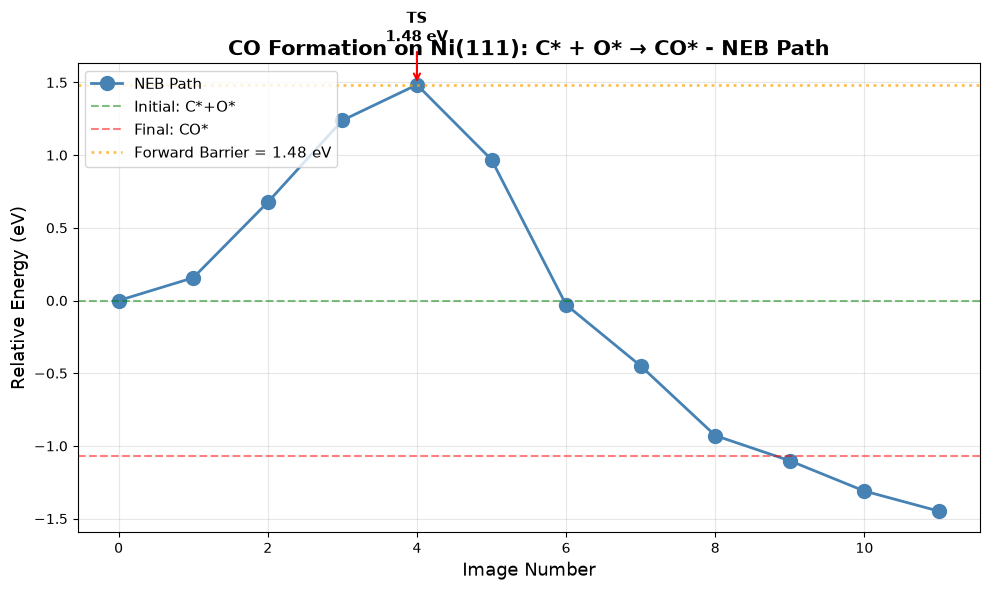
Creating NEB path animation...
→ Saved as neb_path.gif
Visualizing initial state (C* + O*)...
Visualizing transition state...
Visualizing final state (CO*)...
✓ NEB analysis complete!
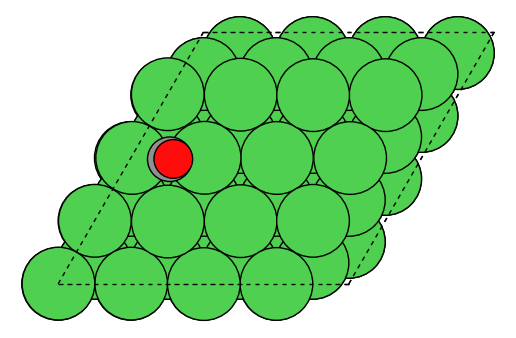
Explore on Your Own
Image convergence: Run with 7 or 9 images. Does the barrier change?
Spring constant: Modify the NEB spring constant. How does this affect convergence?
Alternative paths: Try different initial CO/final C+O configurations. Are there multiple pathways?
Reverse barrier: Calculate E_a(reverse) = E_a(forward) - ΔE. Check Brønsted-Evans-Polanyi relationship.
Diffusion barriers: Compute NEB for C or O diffusion on the surface. How do they compare?
Summary and Best Practices
Key Takeaways
ML Potentials: uma-s-1p2 provides ~1000× speedup over DFT with reasonable accuracy
Bulk optimization: Always use the ML-optimized lattice constant for consistency
Surface energies: Linear extrapolation eliminates finite-size effects
Adsorption: Test multiple sites; lowest energy may not be intuitive
Coverage: Lateral interactions become significant above ~0.3 ML
Barriers: NEB requires careful setup but yields full reaction pathway
Recommended Workflow for New Systems
Optimize Bulk - Determine equilibrium lattice constant
Calculate Surface Energies - Identify stable facets
Wulff Construction - Predict nanoparticle morphology
Low-Coverage Adsorption - Find binding sites and energies
Coverage Study (if coverage-dependent effects are important) - Determine lateral interactions
Reaction Barriers - Calculate activation energies using NEB
Microkinetic Modeling - Predict overall catalytic performance
Accuracy Considerations
| Property | Typical Error | When Critical |
|---|---|---|
| Lattice constants | 1-2% | Strain effects, alloys |
| Surface energies | 10-20% | Nanoparticle shapes |
| Adsorption energies | 0.1-0.3 eV | Thermochemistry |
| Barriers | 0.2-0.5 eV | Kinetics, selectivity |
Rule of thumb: Use ML for screening → DFT for validation → Experiment for verification
Further Reading
UMA Paper: Wood et al. 2025
OMat24 Paper: Barroso-Luque et al., 2024
OC20 Dataset: Chanussot et al., ACS Catalysis, 2021
ASE Tutorial: https://
wiki .fysik .dtu .dk /ase/
Appendix: Troubleshooting
Common Issues
Problem: Convergence failures
Solution: Reduce
fmaxto 0.1 initially, tighten laterCheck if system is metastable (try different starting geometry)
Problem: NEB fails to find transition state
Solution: Use more images (9-11) or better initial guess
Try fixed-end NEB first, then climbing image
Problem: Unexpected adsorption energies
Solution: Visualize structures - check for distortions
Compare with multiple sites
Add D3 corrections
Problem: Out of memory
Solution: Reduce system size (smaller supercells)
Use fewer NEB images
Run on HPC with more RAM
Performance Tips
Use batching: Relax multiple configurations in parallel
Start with DEBUG_MAX_STEPS=50: Get quick results, refine later
Cache bulk energies: Don’t recalculate reference systems
Trajectory analysis: Monitor optimization progress with ASE GUI
Caveats and Pitfalls
1. Task Selection: OMAT vs OC20
Critical choice: Which task_name to use?
task_name="omat": Optimized for bulk and clean surface calculationsUse for: Part 1 (bulk), Part 2 (surface energies), Part 3 (Wulff)
Better for structural relaxations without adsorbates
task_name="oc20": Optimized for surface chemistry with adsorbatesUse for: Part 4-6 (all adsorbate calculations)
Trained on Open Catalyst data with adsorbate-surface interactions
Impact: Using wrong task can lead to 0.1-0.3 eV errors in adsorption energies!
2. D3 Dispersion Corrections
Multiple decisions required:
Whether to use D3 at all?
Small adsorbates (H, O, N): D3 effect ~0.01-0.05 eV (often negligible)
Large molecules (CO, CO₂, aromatics): D3 effect ~0.1-0.3 eV (important!)
Physisorption: D3 critical (can change binding from repulsive to attractive)
RPBE was originally fit for chemisorption energies without D3 corrections, so adding D3 corrections may actually cause small adsorbates to overbind. However, it probably would be important for larger molecules. It’s relatively uncommon to see RPBE+D3 as a choice in the catalysis literature (compared to PBE+D3, or RPBE, or BEEF-vdW).
Which DFT functional for D3?
This tutorial uses
method="PBE"consistently for the D3 correction. This is often implied when papers say they use a D3 correction, but the results can be different if use the RPBE parameterizations.Original paper used PBE for bulk/surfaces, RPBE for adsorption. It’s not specified what D3 parameterization they used, but it’s likely PBE.
When to apply D3?
End-point correction (used here): Fast, run ML optimization then add D3 energy
During optimization: Slower but more accurate geometries
Impact: Usually <0.05 eV difference, but can be larger for weak interactions
3. Coverage Dependence Challenges
Non-linearity at high coverage:
This tutorial assumes linear E_ads(θ) = E₀ + βθ
Reality: Often non-linear, especially near θ = 1 ML. See the plots generated - there is a linear regime for relatively high coverage, and relatively low coverage, but it’s not uniformly linear everywhere. As long as you consistently in one regime or the other a linear assumption is probably ok, but you could get into problems if solving microkinetic models where the coverage of the species in question changes significantly from very low to high.
Why: Phase transitions, adsorbate ordering, surface reconstruction
Solution: Test polynomial fits, look for ordering in visualizations
Low coverage limit:
At θ < 0.1 ML, coverage effects are tiny (<0.01 eV)
Hard to distinguish from numerical noise
Best practice: Focus on 0.25-1.0 ML range for fitting
4. Periodic Boundary Conditions
UMa requires PBC=True in all directions!
atoms.set_pbc([True, True, True]) # Always requiredForgetting this causes crashes or wrong energies
Even for “gas phase” molecules in vacuum
5. Gas Phase Reference Energies
Tricky cases:
H₂(g): UMa handles well (used in this tutorial)
H(g): May not be reliable (use H₂/2 instead)
CO(g), O₂(g): Usually okay, but check against DFT
Radicals: Often problematic
Best practice: Always use stable molecules as references (H₂, not H; H₂O, not OH)
6. Spin Polarization
Key limitation: OC20/UMa does not include spin!
Paper used spin-polarized DFT
Impact: Usually small (0.05-0.1 eV)
Larger for:
Magnetic metals (Fe, Co, Ni)
Open-shell adsorbates (O*, OH*)
Reaction barriers with radicals
7. Constraint Philosophy
Clean slabs (Part 2): No constraints (both surfaces relax)
Best for surface energy calculations
More physical for symmetric slabs
Adsorbate slabs (Part 4-6): Bottom layers fixed
Faster convergence
Prevents adsorbate-induced reconstruction
Standard practice in surface chemistry
Fairchem helper functions: Automatically apply sensible constraints
Trust their heuristics unless you have good reason not to
Check
atoms.constraintsto see what was applied
8. Complex Surface Structures
This tutorial uses low-index facets (111, 100, 110, 211)
Well-defined, symmetric
Easy to generate and analyze
Real catalysts have:
Steps, kinks, grain boundaries
Support interfaces
Defects and vacancies
Challenge: Harder to generate, more configurations to test
9. Slab Thickness and Vacuum
Convergence tests critical but expensive:
This tutorial uses “reasonable” values (4-8 layers, 10 Å vacuum)
Always check convergence for new systems
Especially important for:
Metals with long electron screening (Au, Ag)
Charged adsorbates
Strong adsorbate-induced reconstruction
10. NEB Convergence
Most computationally expensive part:
May need 7-11 images (not just 5)
Initial guess matters a lot
Can get stuck in local minima
Tricks:
Use dimer method to find better TS guess (as shown in Part 6)
Start with coarse convergence (fmax=0.2), refine later
Visualize the path - does it make chemical sense?
Try different spring constants (0.1-1.0 eV/Å)
11. Lattice Constant Source
Consistency is key:
Use ML-optimized lattice constant throughout (as done here)
Don’t mix: ML lattice + DFT surface energies = inconsistent
Alternative: Use experimental lattice constant for everything
12. Adsorbate Placement
Multiple local minima:
Surface chemistry is not convex!
Always test multiple adsorption sites
Fairchem helpers generate ~5 configurations in this tutorial, but you may need more to search many modes. You can already try methods like minima hopping or other global optimization methods to sample more configurations.
For complex adsorbates:
Test different orientations
May need 10-20 configurations
Consider genetic algorithms or basin hopping
- Kreitz, B., Wehinger, G. D., Goldsmith, C. F., & Turek, T. (2021). Microkinetic Modeling of the CO2 Desorption from Supported Multifaceted Ni Catalysts. The Journal of Physical Chemistry C, 125(5), 2984–3000. 10.1021/acs.jpcc.0c09985
- Chanussot, L., Das, A., Goyal, S., Lavril, T., Shuaibi, M., Riviere, M., Tran, K., Heras-Domingo, J., Ho, C., Hu, W., Palizhati, A., Sriram, A., Wood, B., Yoon, J., Parikh, D., Zitnick, C. L., & Ulissi, Z. (2021). Open Catalyst 2020 (OC20) Dataset and Community Challenges. ACS Catalysis, 11(10), 6059–6072. 10.1021/acscatal.0c04525